Comprehensive Review of Novastar MX2000 Pro: Features, Performance, and Core Technology Analysis
The Novastar MX2000 Pro is a state-of-the-art 8K LED display controller, designed as part of the COEX control system series from Xi’an NovaStar Tech Co., Ltd. (NovaStar). With its remarkable features, including 12-bit color depth, 480 Hz capability, real-time multi-screen scaling, and HDR supportability, the MX2000 Pro delivers precise brightness control, true-to-life color fidelity, and exceptional image quality. Its modular card-based design ensures flexibility, stability, and ease of maintenance, making it an ideal solution for large-scale LED display configurations.
In this review, we’ll explore the Novastar MX2000 Pro Controller in detail, covering its advanced features, specifications, applications, and more to help you understand why it stands out in the market.
1. Key Features of the Novastar MX2000 Pro Video Processor
1.1 Input and Output Flexibility
The MX2000 Pro offers unparalleled flexibility with its input and output options:
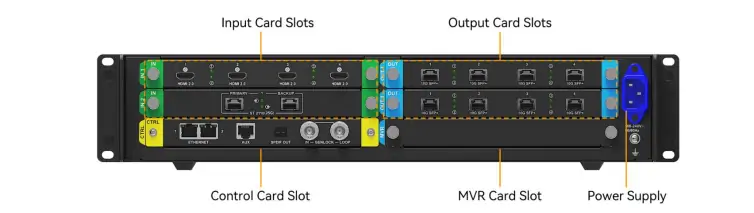
- Input Card Slots:
- Supports up to 10 different types of input cards, including HDMI 2.0, DP 1.2/1.4, 12G-SDI, and ST 2110 (25G/100G).
- Capable of handling resolutions up to 8K@60Hz and frame rates ranging from 23.98 Hz to 480 Hz.
- Authentic 12-bit video input ensures superior color accuracy and depth.
- Output Card Slots:
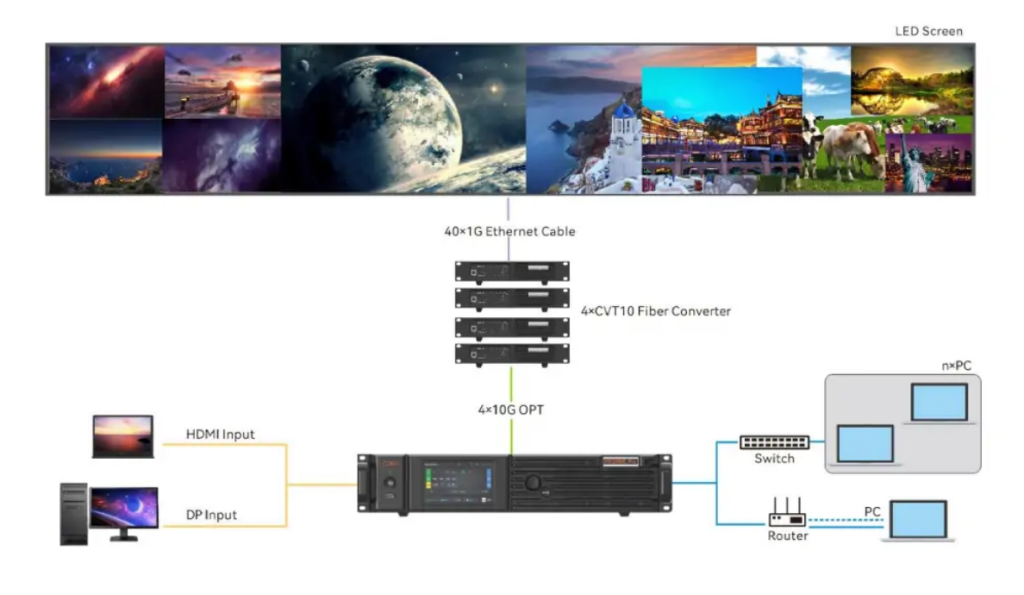
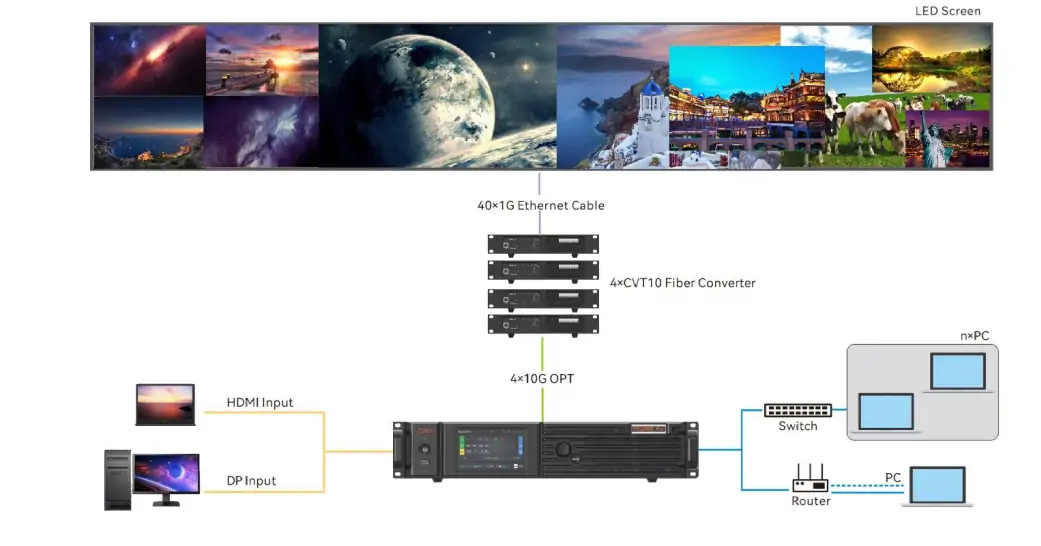
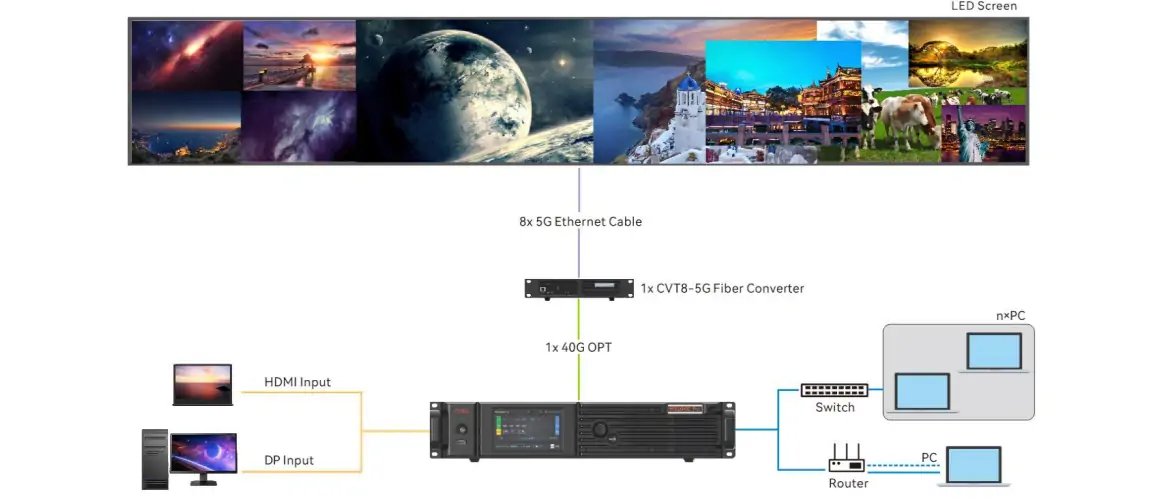
- Two output card slots allow users to configure 4x10G fiber or 1x40G fiber output cards.
- The 1G solution supports up to 650,000 pixels per Ethernet cable, while the 5G solution can handle 2.6 million pixels per Ethernet cable.
- Seamlessly integrates with NovaStar’s CVT10 and CVT8-5G fiber converters for optimal performance.
1.2 Advanced Screen Management
- Card-Based Screen Configuration: Each output card can be customized to support different screen resolutions, enabling flexible multi-screen setups.
- Synchronized Output Splicing: Ensures smooth playback without issues like picture stutter, frame loss, or image tearing.
- No Rectangle Restriction: Ideal for irregularly shaped screens, as blank pixels don’t count toward the total load capacity.
- Preset Management: Save up to 128 customizable presets for quick adjustments to brightness, color temperature, gamma, and other parameters.
1.3 Cutting-Edge Performance Enhancements
- Multi-Layer Support: A single output card supports up to 4 layers, while the entire controller can handle 8x 4K layers.
- Image Scaling: Offers four scaling modes—custom, pixel-to-pixel, snap-to-canvas, and fill screen—for versatile content presentation.
- Layer Roaming: Enables cross-card layer output within the same screen.
- Color Replacement: Replace specific colors in an image without affecting others, ideal for creative visual effects.
- 14-Channel Color Correction: Fine-tune hue, saturation, and brightness for black, white, and the 12 standard RGB-derived colors.
- 3D LUT: Use .cube files with precision levels of 17x17x17, 33x33x33, or 65x65x65 for advanced color calibration.
- Full-Grayscale Calibration: Works with NovaStar’s CC3 calibration system and scientific-grade cameras like CC60 and C3200 to ensure uniformity across all grayscales.
1.4 Enhanced Control and Monitoring
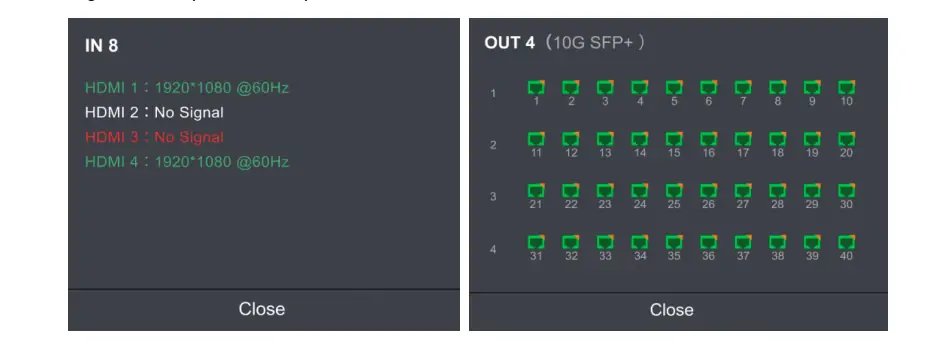
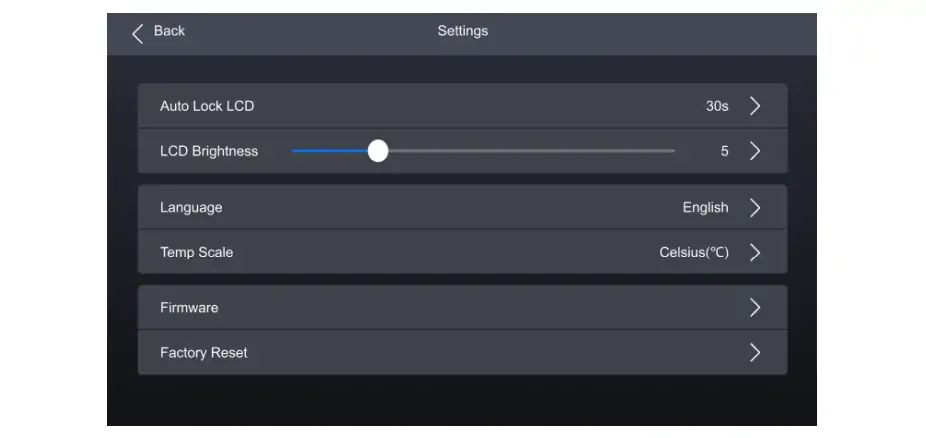
- LCD Touchscreen: A responsive 5-inch touchscreen provides effortless access to device status, settings, and commands.
- VMP Software Integration: The Vision Management Platform (VMP) enhances control and management capabilities, offering features like project management, screen calibration, and real-time monitoring.
- Seamless Backup: Hot backup between devices, cards, and Ethernet ports ensures uninterrupted operation during malfunctions.
- Automated System Monitoring: Monitors fan speed, module temperatures, voltage levels, and operational status, issuing alerts for any anomalies.
2. Applications of the MX2000 Pro All-in-One Controller
The Novastar MX2000 Pro is widely used in a variety of professional settings, thanks to its versatility and robust performance:
- Rental Services: Perfect for large events requiring high-resolution displays.
- xR/VP Studios: Delivers immersive visuals for virtual production and extended reality environments.
- TV Production: Ensures accurate color reproduction and low latency for live broadcasts.
- E-Sports Events: Provides smooth, high-refresh-rate visuals for competitive gaming.
- Exhibition Halls: Supports large fixed installations with intricate designs and irregular shapes.
3. Specifications of the Novastar MX2000 Pro
3.1 Electrical Specifications
- Power Supply: 100-240V~, 50/60Hz
- Max Power Consumption: 260W (varies based on installed cards)
- Operating Environment: –5°C to +45°C, 0% RH to 80% RH (non-condensing)
3.2 Physical Specifications
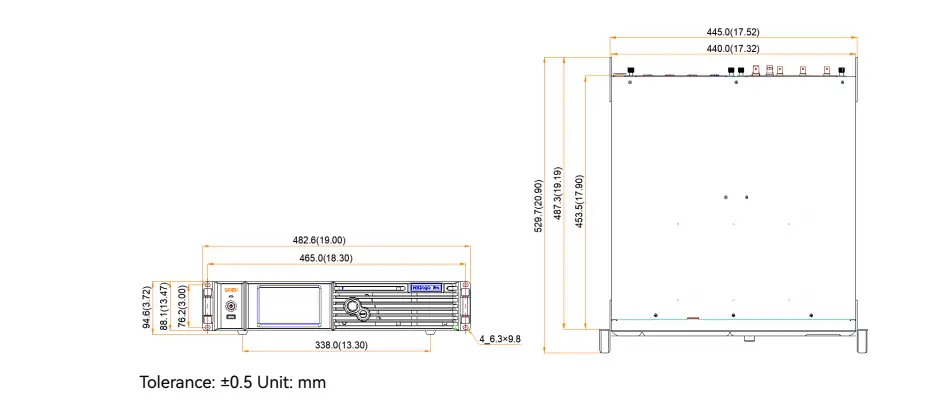
- Dimensions: 482.6 mm × 94.6 mm × 529.7 mm (including foot pads)
- Weight:
- Net weight: 11.1 kg (chassis only)
- Total weight: 12.0 kg (including accessories and packaging)
- IP Rating: IP20 (water intrusion protection required)
3.3 Input Resolutions and Frame Rates
The MX2000 Prosupports a wide range of resolutions and frame rates, ensuring compatibility with diverse video sources:
- HDMI 2.0: Up to 4K@60Hz with YCbCr 4:2:0 color sampling.
- HDMI 2.1: Supports 8K@30Hz and 4K@120Hz.
- DP 1.4 (8K@60Hz): Handles resolutions up to 7680×4320@60Hz.
- ST 2110 (100G): Capable of managing 8K@60Hz with multiple video streams.

3.4 Ethernet Port Load Capacity
- 1G Solution:
- Max load per Ethernet port: 659,722 pixels (8-bit@60Hz).
- Compatible with A10s Pro and its derivatives.
- 5G Solution:
- Max load per Ethernet port: 2,951,200 pixels (8-bit@60Hz).
- Works seamlessly with XA50 Pro and CA50E receiving cards.
For detailed information, refer to the MX2000 Pro User Manual available on NovaStar’s official website.
4. Why Choose the Novastar MX2000 Pro?
4.1 Premium Image Quality
With 12-bit color depth and support for HDR10 and HLG, the MX2000 Pro ensures vibrant, lifelike visuals. Whether you’re working with 8K resolution or lower resolutions at higher frame rates, this controller delivers consistent brightness and color fidelity.
4.2 High Performance and Reliability
- Zero-Frame Latency: Achieves processing latency of less than 1 ms, making it ideal for real-time applications.
- Frame Rate Adaptation: Automatically adjusts display effects for frame rates ranging from 23.98 Hz to 480 Hz, ensuring consistent brightness and color temperature.
- Shutter Fit: Optimizes driver IC parameters for camera shooting, eliminating issues like black lines and grayscale loss in xR scenarios.
4.3 Scalability and Versatility
The MX2000 Pro supports both 1G and 5G solutions, catering to different bandwidth requirements. Its modular design allows users to mix and match input/output cards to suit their specific needs, whether for small-scale setups or massive LED installations.
5. Novastar MX2000 Pro Price
While the Novastar MX2000 Pro price may vary depending on the configuration and region, it represents excellent value for its cutting-edge features and performance. For accurate pricing, contact authorized NovaStar distributors or visit their official website.
6. Novastar MX2000 Pro Resource Access
- User Manual: Comprehensive operation and configuration guide
- Specification: Detailed product information for Novastar MX2000 Pro
These resources provide the technical foundation for maximizing your investment in the MX2000 Pro platform.
7. Conclusion
The Novastar MX2000 Pro Controller is a game-changer in the world of LED display technology. Its combination of high pixel load capacity, advanced color processing, and intuitive controls makes it a top choice for professionals in rental services, studios, and large-scale installations. Paired with the Vision Management Platform (VMP), it offers unmatched ease of use and management capabilities.
Whether you’re looking for a reliable all-in-one controller or a scalable solution for complex LED setups, the MX2000 Pro is a worthy investment. Explore its full potential by downloading the MX2000 Pro User Manual and discovering how it can elevate your projects to the next level.