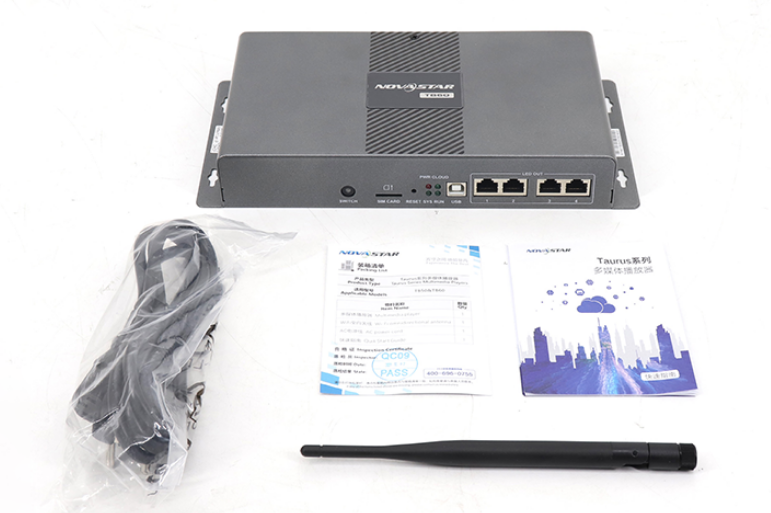
Complete introduction and user manual of NovaStar TB60
The NovaStar TB60 represents the pinnacle of multimedia player technology in the Taurus Series, designed specifically for full-color LED displays. This cutting-edge device seamlessly integrates playback and sending capabilities, allowing users to publish content and control LED displays with unprecedented ease.
Whether you’re managing digital signage in retail environments or implementing smart city displays, the NovaStar TB60 delivers reliable performance with cloud-based management.
Let’s explore everything you need to know about this powerful multimedia solution.
1.Overview of NovaStar TB60
The NovaStar TB60 is a next-generation multimedia player engineered for professional LED display applications. Its robust architecture supports both content publishing and screen control from any internet-connected device, making it an ideal choice for modern display management.
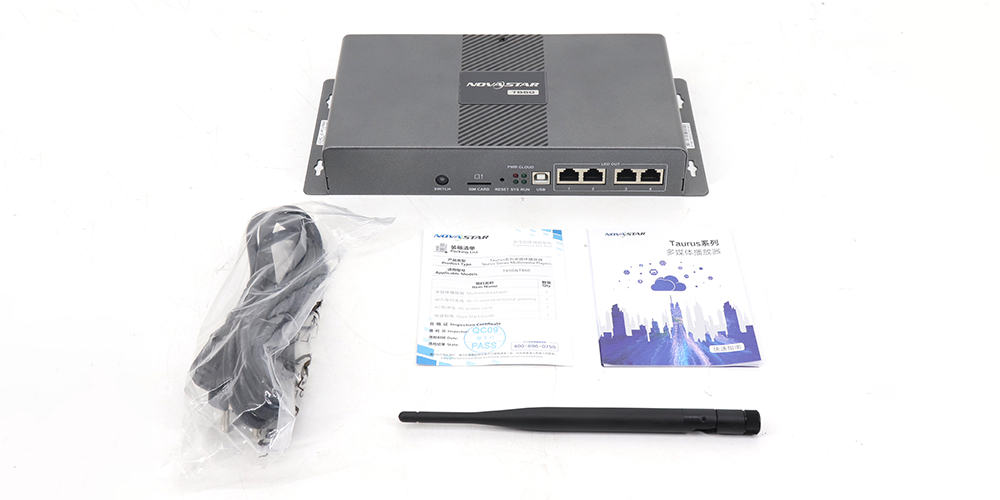
1.1 Features
1.1.1 Output
Loading Capacity: The NovaStar TB60 supports a maximum loading capacity of 2,300,000 pixels, with both width and height up to 4096 pixels.
Gigabit Ethernet Ports: Equipped with four Gigabit Ethernet ports, all set as primary by default. Users can configure two as primary and two as backup, ensuring reliable data transmission and system redundancy.
Audio Output: The TB60 includes a stereo audio connector supporting 32 kHz, 44.1 kHz, and 48 kHz sample rates. When using NovaStar’s multifunction card, a 48 kHz rate is required for best audio performance.
HDMI Output: It provides an HDMI 1.4 output capable of 1080p@60Hz with loop-through support, simplifying connection with other display equipment.
1.1.2 Input
HDMI Input: The TB60 offers an HDMI 1.4 input for connecting video sources. In synchronous mode, the input signal is automatically scaled to match the full screen, delivering a seamless display experience.
Sensor Interfaces: It includes two sensor connectors compatible with brightness or temperature/humidity sensors, enabling automatic environmental adjustments for optimal screen performance.
1.1.3 Control
USB Connectivity: The device features a USB 3.0 (Type A) port for media playback and firmware upgrades, along with a USB (Type B) port for direct PC connection.
Network Control: A dedicated Gigabit Ethernet port provides reliable connectivity to LAN or public networks for content publishing and remote control.
1.1.4 Performance
High-Performance Processor: Powered by a quad-core ARM A55 1.8 GHz CPU, the TB60 supports H.264/H.265 4K@60Hz decoding, ensuring smooth and detailed video playback.
Storage & Playback Capability: With 1 GB RAM and 32 GB internal storage, it supports simultaneous playback of 2× 4K, 6× 1080p, 10× 720p, or 20× 360p video streams—delivering stable, high-quality performance across various display setups.
1.2 Specifications
| Category | Parameter | Specification |
| Electrical Parameters | Input Power | 100-240V~, 50/60Hz, 0.6A |
| Electrical Parameters | Max Power Consumption | 18 W |
| Storage Capacity | RAM | 1 GB |
| Operating Environment | Internal Storage | 32 GB |
| Operating Environment | Temperature | -20°C to +60°C |
| Operating Environment | Humidity | 0% RH to 80% RH, non-condensing |
| Physical | Dimensions | 274.3 mm × 139.0 mm × 40.0 mm |
| Physical | Net Weight | 1230.4 g |
| System | Operating System | Android 11.0 |
1.3 Appearance
1.3.1 Front and Rear Panel
 100vw, 1000px” data-dt-location=”https://www.eagerled.com/novastar-tb60/novastar-tb60-front-and-rear-panel/” data-lazy-src=”https://www.eagerled.com/wp-content/uploads/2025/10/NovaStar-TB60-Front-and-Rear-Panel.png” /><i></i></a></figure>
</div>
<div class= "NovaStar TB60Front and Rear Panel LED Display Manufacturer in China EagerLED")
The NovaStar TB60 features a well-organized front panel with a mode switch (SWITCH), SIM card slot, reset button, and USB (Type B) port. The rear panel includes sensor connectors, HDMI IN/OUT ports, Wi-Fi antenna connector, Ethernet port, USB 3.0 port, audio output, and power input.
Indicator Lights:
PWR (Red): Steady on = normal power operation
SYS (Green): Flashing every 2s = normal operation
CLOUD (Green): Steady on = internet connection available
RUN (Green): Flashing every 0.5s = FPGA functioning normally
2.What Is the Price of NovaStar TB60?
Competitively priced at approximately $400 USD, the NovaStar TB60’s advanced features and powerful performance make it an excellent value. For the latest pricing and possible volume discounts, please visit our accessories website: ledcontrollercard or contact an authorized dealer.
3.NovaStar TB60 Functions
The NovaStar TB60 delivers comprehensive control functionality through multiple channels. Users can publish content and control screens from computers, smartphones, or tablets, with remote access capabilities enabling management from anywhere with internet connectivity.
Key functional features include:
- Wi-Fi Mode Flexibility:Switch between Wi-Fi AP mode (default SSID: “AP+Last 8 digits of SN”) and Wi-Fi STA mode
- Synchronous/Asynchronous Modes:Toggle between internal video sources and external HDMI inputs
- Multi-Screen Synchronization: Achieve perfect timing across displays using NTP, GPS (with 4G module), or RF synchronization
- Network Priority System: Wired > Wi-Fi > 4G network selection for optimal connectivity
4.Applications
The NovaStar TB60 excels across numerous applications:
- Retail Environments: Digital signage, shelf displays, and mirror displays
- Advertising: Dynamic content delivery for maximum customer engagement
- Smart City Infrastructure: Lamp-post displays and public information systems
- Chain Store Networks: Centralized content management across multiple locations
- Fixed Installations: Permanent displays requiring reliable, long-term operation
5.NovaStar TB30, TB50, and TB60 Comparison
 100vw, 1000px” data-dt-location=”https://www.eagerled.com/novastar-tb60/novastar-tb30e38081tb50e38081tb60/” data-lazy-src=”https://www.eagerled.com/wp-content/uploads/2025/10/NovaStar-TB30TB50TB60.png” /><i></i></a></figure>
</div>
<div class= "NovaStar TB30TB50TB60 LED Display Manufacturer in China EagerLED")
| Feature | TB30 | TB50 (TB40) | TB60 |
| Loading Capacity | 650,000 pixels | 1,300,000 pixels | 2,300,000 pixels |
| Max Resolution | 4096×4096 | 4096×4096 | 4096×4096 |
| LED Output Ports | 2 (1 primary + 1 backup) | 2 (configurable) | 4 (configurable as 2+2) |
| HDMI Input | No | Yes | Yes |
| HDMI Output | No | Yes (1920×1200@60Hz) | Yes (1080p@60Hz) |
| Wi-Fi Modes | AP & STA simultaneously | AP & STA simultaneously | AP/STA switching |
| Power Input | 100-240V~ | DC 12V 2A | 100-240V~ |
| Best For | Small displays | Medium installations | Large, complex setups |
6.Conclusion
The NovaStar TB60 represents the pinnacle of LED display control technology, offering unparalleled flexibility, reliability, and performance for professional applications. Whether you’re deploying a single display or managing a network of screens, the TB60 provides the tools you need for success.