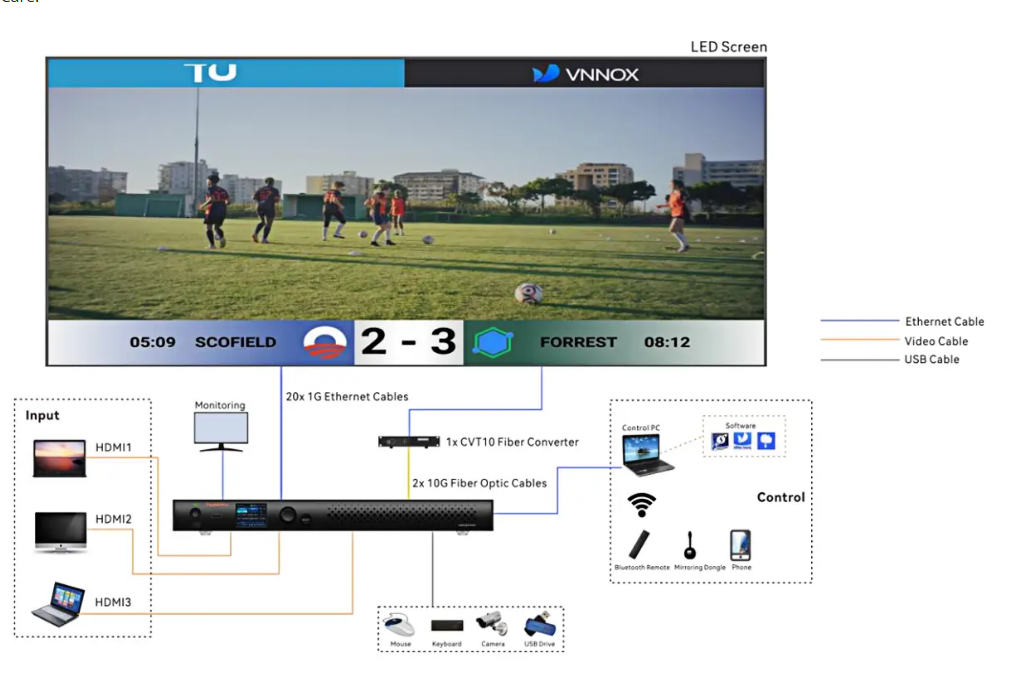
NovaStar TU40 Pro playback control processor fully interpreted
NovaStar TU40 Pro LED playback control processor delivers professional-grade control for LED displays through its all-in-one design. Integrating Android system, video processing, and sending card functionality, it supports up to 13 million pixels while offering multiple control options including front-panel operation, remote control, and mobile apps. With advanced features like multi-platform wireless mirroring and AI image enhancement, it provides complete playback control solutions for corporate, educational, and commercial applications.
.NovaStar TU40 Pro Hardware Specifications and System Performance
TU40 Pro LED playback control processor Hardware Overview
The TU40 Pro is built to deliver exceptional performance with its robust hardware configuration:
| Specification | Details |
| Processor | Quad-core A73 + quad-core A53 ARM processor @ 2.2 GHz |
| RAM | 8 GB |
| Storage | 128 GB internal storage |
| Maximum Load Capacity | 13 million pixels |
| Input Voltage | 100-240V~, 50/60Hz, 2.5A Max |
| Power Consumption | 53.9W (rated) |
| Operating Temperature | –20°C to +50°C |
| Humidity | 5% RH to 85% RH, non-condensing |
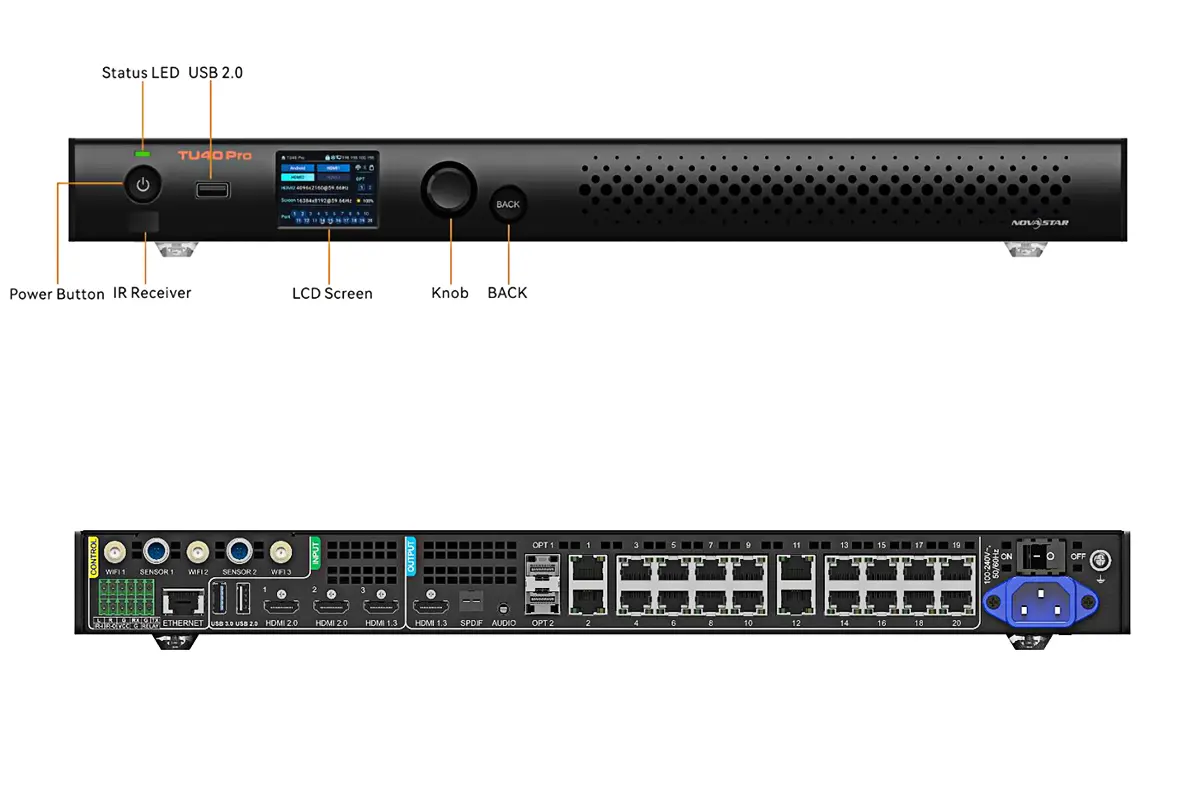
System Performance & Advanced Playback Control
Equipped with a high-performance processor and ample memory, the TU40 Pro LED playback control processor excels in handling demanding playback control tasks for large-scale video walls:
- Multi-Stream Decoding: Capable of decoding and playing back multiple video streams simultaneously, including 4 streams of 4K video or 20 streams of 360p video.
- High-Efficiency Codec Support: Supports H.264 and H.265 decoding at 4K@60Hz, ensuring compatibility with high-quality source materials.
- Output Flexibility: Offers precise output image scaling, supporting a width range from 64 to 16,384 pixels and a height range from 64 to 8,192 pixels, providing ultimate flexibility for video wall configurations.
- Android Platform: Runs on Android 13, allowing for the seamless operation of third-party applications and enabling expanded functionality beyond standard playback control.
Its ability to manage complex displays and deliver seamless performance makes it a standout video wall processor for mission-critical applications.
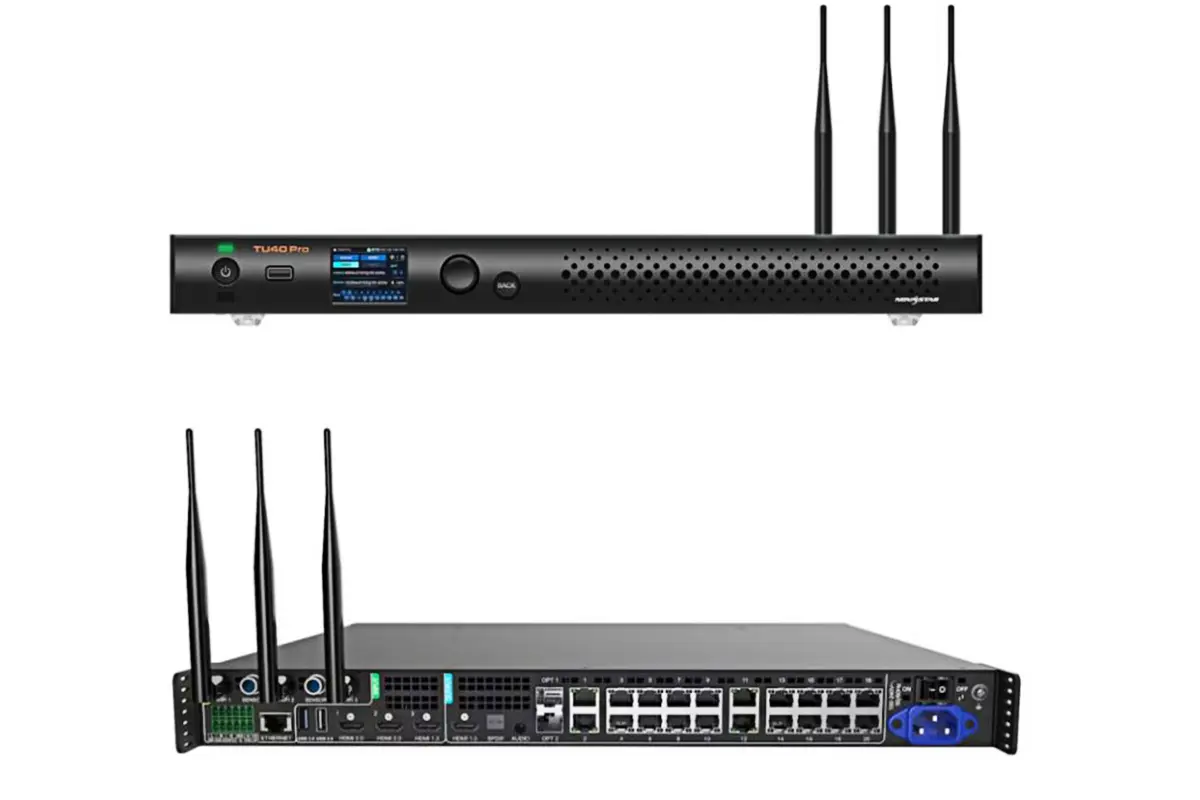
TU40 Pro Resources Download
2. Key Features of NovaStar TU40 Pro Playback Control Processor
The TU40 Pro offers powerful yet easy-to-use functions that make professional playback control simple and efficient.
Smart Playback Management
- Easy Content Control: Manage your media library and create playlists directly on the device. Set programs to play automatically when the system starts up.
- Flexible Source Switching: Easily switch between built-in Android apps, HDMI inputs, and wireless sources using the remote control or on-screen menu.
Smart Image Optimization
- One-Click Display Modes: Choose from four optimized modes (Standard for general content, Meeting for documents, Vivid for media, Skin for video calls) for perfect picture quality in any situation.
- Auto Image Enhancement: The system automatically adjusts colors, brightness, and sharpness based on what you’re playing for the best viewing experience.
I am text block. Click edit button to change this text. Lorem ipsum dolor sit amet, consectetur adipiscing elit. Ut elit tellus, luctus nec ullamcorper mattis, pulvinar dapibus leo.
Easy Screen Sharing
- Wireless Mirroring: Share your screen wirelessly from any device – Windows, Mac, iOS, or Android – without cables or complicated setup.
- Split Screen Display: Show multiple sources at once with optional 2, 4, or 9 split-screen modes – perfect for comparing content or monitoring different feeds.
Simple System Management
- Quick Diagnostics: Run automatic system checks to identify any issues with hardware, display, or network connection.
- Remote Monitoring: Use the VNNOX Care app to check system status and manage settings from your phone.
3. TU40 Pro Playback Control Processor Input and Output Connectivity Options
The TU40 Pro provides extensive input and output options, ensuring compatibility with a wide range of devices:
Inputs:
| Port Type | Quantity | Description |
| HDMI 1.3 Input | 1 | Supports resolutions up to 1920×1080@60Hz |
| HDMI 2.0 Inputs | 2 | Supports resolutions up to 3840×2160@60Hz |
| USB 2.0 Inputs | 2 | For connecting peripherals like mice, keyboards, cameras, and speakers |
| USB 3.0 Input | 1 | For faster data transfer, firmware updates, and exporting logs |
Outputs:
| Port Type | Quantity | Description |
| Gigabit Ethernet Outputs | 20 | For connecting to LED panels |
| OPT Outputs | 2 | For fiber optic conversion |
| Audio Outputs | 4 | Includes SPDIF, 3.5-mm jack, HDMI eARC, and Phoenix connector |
| HDMI 1.3 Output | 1 | For monitoring output during debugging |
Control & Expansion Interfaces
- ETHERNET Port: 1x Gigabit Ethernet port for connecting to an external network or control software.
- Wi-Fi/BT Antenna Ports: 3x ports for connecting Wi-Fi and Bluetooth antennas, enabling wireless operations.
- Sensor Ports: 2x ports for connecting NovaStar’s optional light sensors or temperature and humidity sensors.
- Phoenix Connector: A multi-purpose 12-pin connector for audio output (L/R), RS232 control, infrared input/output, and a relay for external power management.
4. NovaStar TU40 Pro Advanced Playback and Control Functions
The TU40 Pro stands out as a cutting-edge video wall processor with a host of innovative features:
Integrated Android System: The TU40 Pro LED playback control processor runs on Android 13.0, enabling third-party app support and offering a desktop-like user interface.
Powerful Playback Control: With support for up to 13 million pixels, the processor ensures smooth playback of high-resolution content, including 4K videos and multi-stream media.
Wireless Screen Mirroring: Compatible with Windows, macOS, iOS, and Android devices, the TU40 Pro video wall processor allows effortless wireless screen mirroring across platforms.
Dynamic Image Enhancement: Real-time frame analysis improves display contrast, sharpness, and color accuracy while reducing power consumption.
Multi-Mode Display Effects: Choose from four display modes—Standard, Meeting, Vivid, and Skin—for optimal visual experiences in various scenarios.
Remote and App Control: Manage your LED display via the included Bluetooth remote or mobile apps like ViPlex Handy and VNNOX Care.
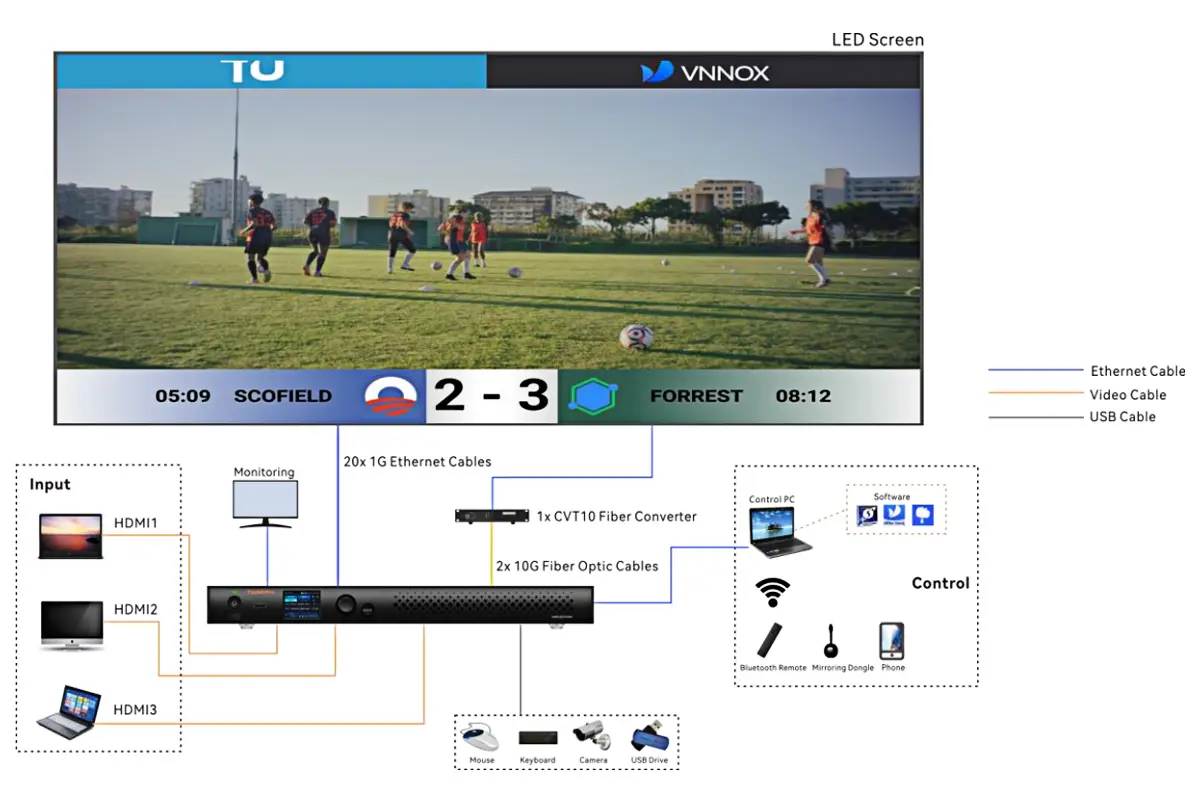
5. TU40 Pro Playback Control Processor Setup and Operation Guide
Getting your TU40 Pro up and running is a simple process. This guide walks you through the essential steps for setup and daily operation.
Hardware Installation & Connection
- Physical Setup: The unit can be mounted on a wall, placed on a surface, or installed into a cabinet for flexible installation.
- Connect LED Screen: Link the LED display panels to the TU40 Pro’s 20 Ethernet output ports using standard network cables.
- Connect Sources: Plug in your video sources (like laptops or media players) into the HDMI inputs on the rear panel.
- Power On: Connect the provided power cable and switch on the device.
Initial System Setup
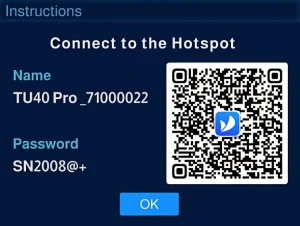
- First-Time Startup: Follow the on-screen instructions to select your language and connect to the device’s Wi-Fi hotspot for initial configuration.
- Remote Pairing: Point the included remote at the device’s IR receiver and simultaneously press the Home and Menu buttons to pair via Bluetooth.
- Network Configuration: Connect the processor to your local network via Wi-Fi or the wired Ethernet port for full functionality.
Essential Daily Operations
- Source Control: Easily switch between the Android system, HDMI inputs, and wireless streams using the remote control or the front-panel knob.
- Quick Adjustments: Adjust screen brightness, volume, and select display modes (Standard, Meeting, Vivid, Skin) directly from the main LCD menu.
- Basic Playback Control: Use the remote to play, pause, and navigate through media content from USB drives or the internal storage.
Recommended Control Apps
- For Content & Mirroring: Install ViPlex Handy on your smartphone for wireless screen mirroring, program editing, and publishing.
- For System Management: Use VNNOX Care for initial screen configuration, topology setup, and system diagnostics.
6. Conclusion
For professionals seeking a reliable, scalable, and technologically advanced playback control system, the TU40 Pro represents not just a product, but a long-term investment in visual excellence and operational efficiency.