Novastar MSD600 Sending Card Detailed Explanation: Core Functions and Basic Settings
The Novastar MSD600 LED Sending Card is a versatile and cost-effective solution for managing LED displays. Whether you’re setting up a small indoor screen or orchestrating a large-scale outdoor installation, the MSD600 provides the tools you need to achieve seamless performance. In this guide, we’ll explore its features, compare it with similar models, troubleshoot common issues, and provide insights into its specifications and pricing. Let’s dive in!
1. What Is the Novastar MSD600 LED Sending Card?
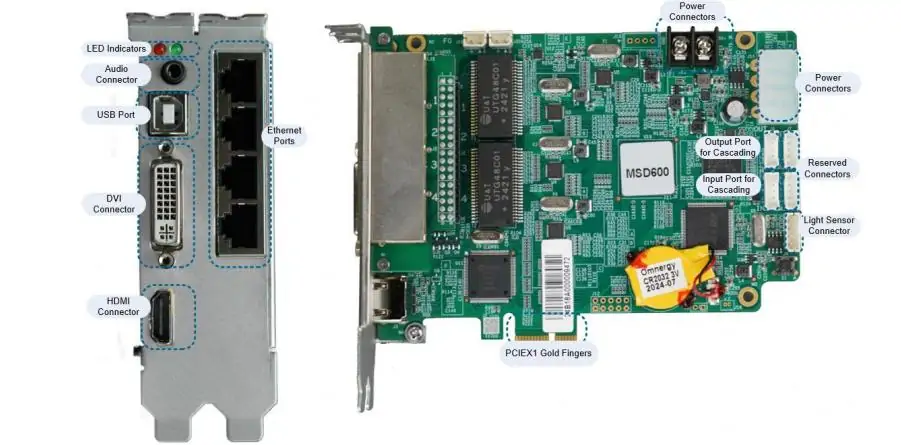
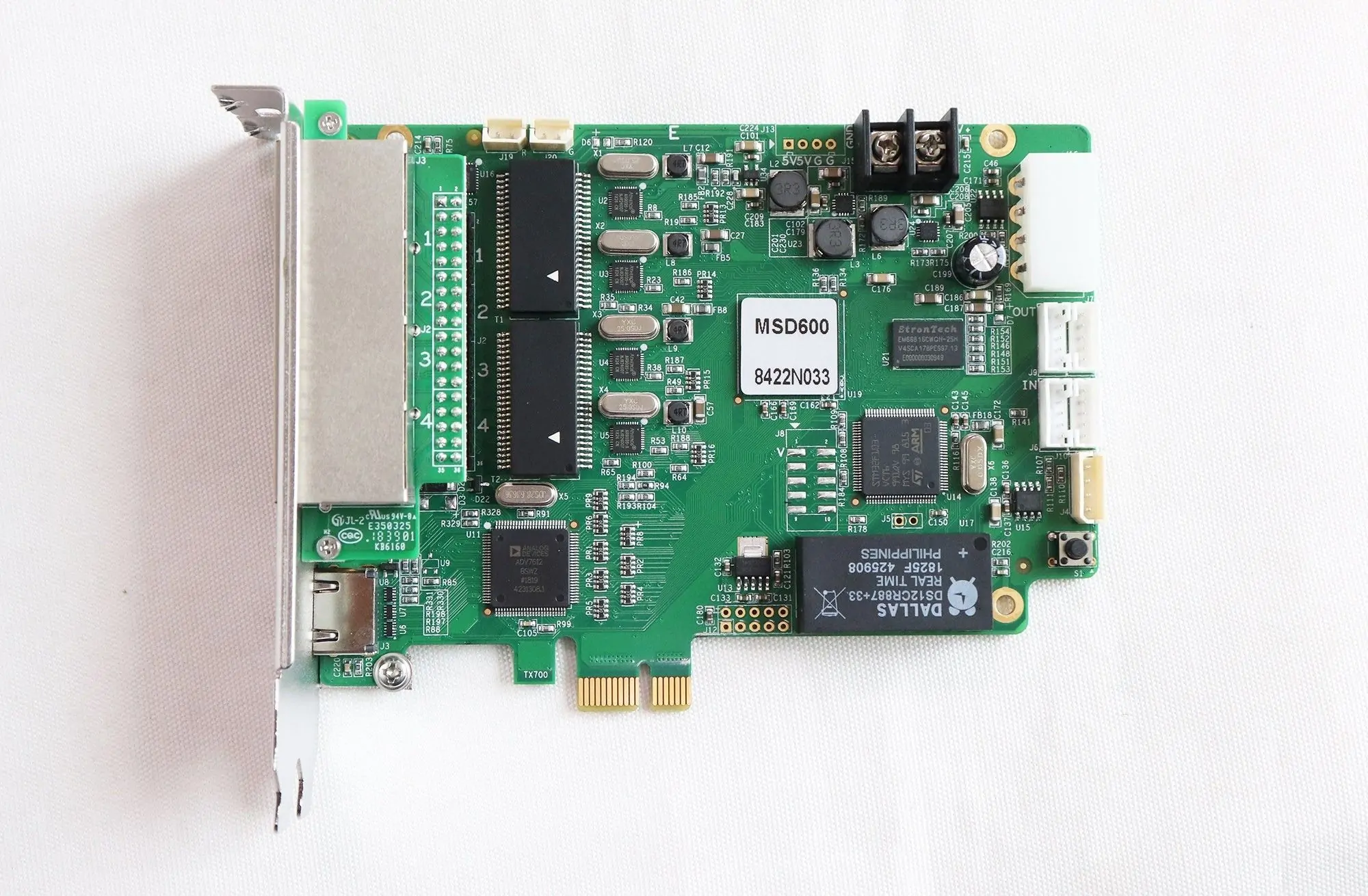
Novastar MSD600 LED Sending Card is a high-performance sending card designed to transmit video signals from a computer to an LED display system. It supports multiple input types, including DVI, HDMI, and audio, and offers four Gigabit Ethernet outputs for efficient data distribution. With a maximum resolution of 1920×1200@60Hz, the MSD600 ensures crisp visuals for applications like concerts, live events, security monitoring centers, and sports arenas.
This sending card stands out due to its flexibility and advanced features. For instance, it can be cascaded with up to 20 devices via UART ports, making it ideal for expansive installations. Additionally, its light sensor connector allows automatic brightness adjustments based on ambient lighting conditions, ensuring optimal viewer comfort and energy efficiency.
Whether you’re using it as a Novastar MSD600 LED Screen Driver Card or a Novastar MSD600 LED Control Card, this product is engineered to deliver consistent performance across various environments.
2. Key Features of Novastar MSD600 LED Screen Driver Card
a. Versatile Input Options
The MSD600 boasts three input connectors:
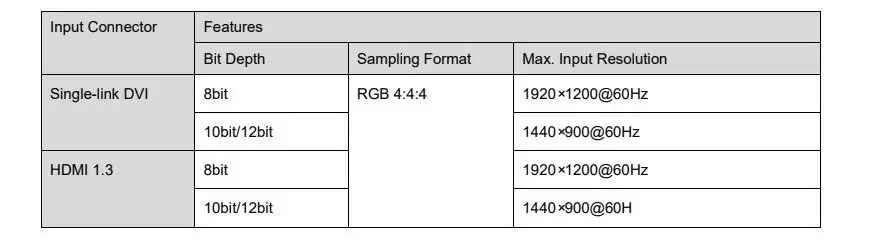
- 1x SL-DVI: Supports resolutions up to 1920×1200@60Hz and custom resolutions with a maximum width of 3840 pixels.
- 1x HDMI 1.3: Compatible with HDCP 1.4 and capable of handling resolutions up to 1920×1200@60Hz.
- 1x AUDIO Input: Allows synchronized audio transmission alongside video content.
These inputs ensure compatibility with a wide range of video sources, making the MSD600 adaptable to diverse use cases.
b. High-Speed Ethernet Outputs
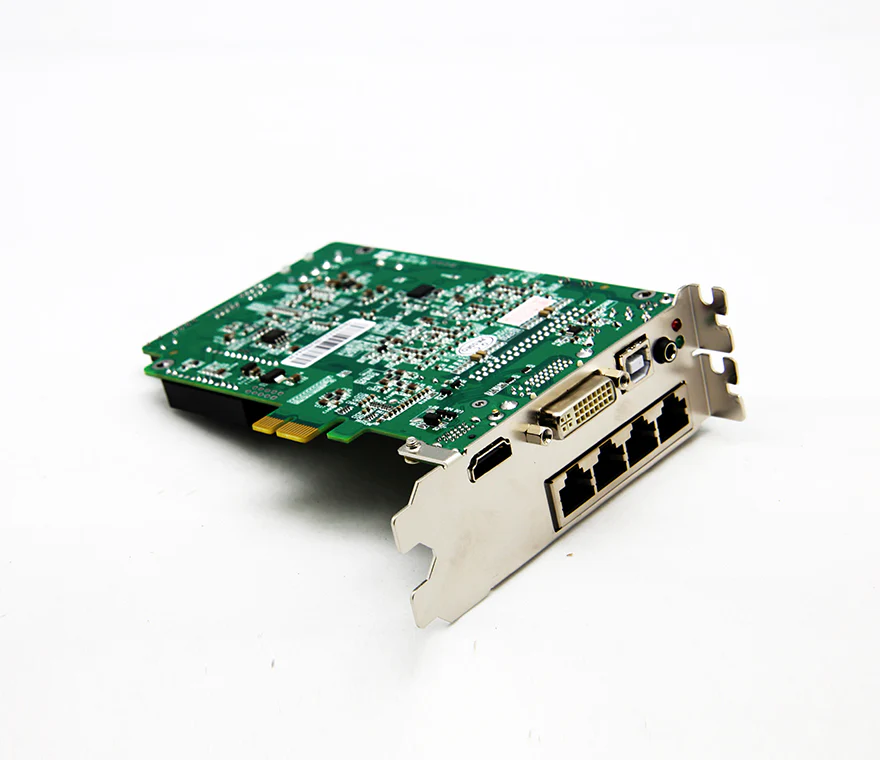
With four RJ45 Gigabit Ethernet ports, the MSD600 delivers robust data transmission. Each port supports up to 650,000 pixels, enabling smooth operation even in large-scale installations. Redundancy between Ethernet ports further enhances reliability by preventing connection mishaps.
c. Pixel-Level Calibration
One standout feature of the MSD600 is its ability to perform pixel-level brightness and chroma calibration when paired with NovaStar’s precision calibration tools. This ensures uniform brightness and accurate color reproduction across every pixel, eliminating inconsistencies that could detract from the viewing experience.
d. Cascading Capability
Equipped with two UART control ports (IN and OUT), the MSD600 allows users to cascade up to 20 devices. This functionality simplifies the creation of intricate display configurations while maintaining flawless synchronization.
e. Ambient Light Sensor Integration
Novastar MSD600 includes a light sensor connector, enabling automatic screen brightness adjustments based on ambient lighting. This feature not only enhances viewer comfort but also contributes to energy savings.
f. Certifications and Compliance
Novastar MSD600 LED sending card complies with global standards such as EMC, RoHS, PFoS, and FCC. These certifications guarantee safe and reliable operation, ensuring peace of mind for users worldwide.
3. Novastar MSD600 vs MSD300 LED Control Card: Pros and Cons
When choosing between Novastar MSD600 and the older MSD300, it’s essential to weigh their respective strengths and limitations.
3.1 Pros of the MSD600
- Higher Resolution Support: The MSD600 supports resolutions up to 1920×1200@60Hz, surpassing the capabilities of the MSD300 LED screen driver card.
- Enhanced Connectivity: With four Ethernet outputs compared to the MSD300’s two, the MSD600 offers greater scalability and redundancy.
- Pixel-Level Calibration: Unlike the MSD300, the MSD600 integrates advanced calibration features for improved visual consistency.
- Cascading Flexibility: The Novastar MSD600 LED screen driver card can cascade up to 20 devices, doubling the capacity of the MSD300.
3.2 Cons of the MSD600
- Slightly Higher Cost: While more feature-rich, the MSD600 LED sending card comes at a premium price compared to the MSD300.
- Complexity for Beginners: Its advanced features may require additional training for first-time users.
In summary, the MSD600 represents a significant upgrade over the MSD300, particularly for professionals seeking higher performance and scalability.
4. Novastar MSD600 LED Sending Card Specifications
Here’s a detailed breakdown of the MSD600’s technical specifications:
4.1 Electrical Specifications
- Input Voltage: DC 3.3 V to 5.5 V
- Rated Current: 1.32 A
- Power Consumption: 6.6 W
4.2 Operating Environment
- Temperature Range: –20°C to +75°C
- Humidity: 10% RH to 90% RH (non-condensing)
4.3 Physical Dimensions
- Card Size: 137.9 mm × 99.7 mm × 39.0 mm
- Weight: 125.3 g (single card)
- Packaging: Cardboard box (335 mm × 190 mm × 62 mm) includes accessories like USB and DVI cables.
 100vw, 869px” data-dt-location=”https://www.eagerled.com/novastar-msd600-led-sending-card/novastar-msd600-led-control-card-dimensions/” data-lazy-src=”https://www.eagerled.com/wp-content/uploads/2026/02/Novastar-MSD600-LED-Control-Card-Dimensions.webp” /></div>
</figure>
</div>
<div id= "Novastar MSD600 LED Control Card Dimensions LED Display Manufacturer in China EagerLED")
4.4 Connectivity
- Inputs: SL-DVI, HDMI 1.3, AUDIO
- Outputs: Four RJ45 Gigabit Ethernet ports
- Control Ports: Type-B USB 2.0, UART IN/OUT
4.5 Video Source Compatibility
- Bit Depth: 8-bit, 10-bit, and 12-bit support
- Max Resolution: 1920×1200@60Hz (8-bit), 1440×900@60Hz (10-bit/12-bit)
 100vw, 873px” data-dt-location=”https://www.eagerled.com/novastar-msd600-led-sending-card/novastar-msd600-led-sending-card-specifications/” data-lazy-src=”https://www.eagerled.com/wp-content/uploads/2026/02/Novastar-MSD600-LED-Sending-Card-Specifications.webp” /></div>
</figure>
</div>
</div>
</div>
</div>
</div>
<div id= "Novastar MSD600 LED Sending Card Specifications LED Display Manufacturer in China EagerLED")
5. Novastar MSD600 Sending Card Price
The Novastar MSD600 LED Sending Card is competitively priced, offering excellent value for its feature set. Prices typically range from $80 to $150, depending on the supplier and region. For bulk purchases or projects exceeding $399, many distributors offer free shipping under their standard policies.
While the initial investment may seem steep compared to entry-level alternatives, the Novastar MSD600 LED sending card’s advanced capabilities justify the cost. Its scalability, reliability, and certification compliance make it a worthwhile addition to any professional setup.
6. Novastar MSD600 LED Control Card Troubleshooting Tips
Despite its robust design, occasional issues may arise during setup or operation. Here are some troubleshooting tips:
Issue 1: No Video Input Detected
Solution: Check the RUN indicator (green). If it flashes slowly once every 2 seconds, verify all input connections. Ensure the video source matches the supported resolutions.
Issue 2: Poor Image Quality
Solution: Use NovaStar’s calibration software to adjust brightness and chroma settings. Confirm that the input resolution aligns with the LED wall’s native resolution.
Issue 3: Cascading Failures
Solution: Inspect UART connections between cascaded devices. Ensure firmware versions are consistent across all units.
Issue 4: Overheating
Solution: Verify adequate ventilation around the device. Avoid obstructing airflow to prevent overheating.
For persistent problems, consult NovaStar’s official support team or refer to the user manual for detailed guidance.
7. Conclusion
Novastar MSD600 LED Sending Card is a powerful and versatile tool for managing LED displays. Its rich feature set—including multiple input options, high-speed Ethernet outputs, pixel-level calibration, and cascading capability—makes it suitable for both novice users and seasoned professionals. Whether deployed in rental applications, fixed installations, or creative LED screens, the MSD600 delivers exceptional performance and reliability.
By understanding its specifications, comparing it with alternatives like the MSD300, and addressing potential issues proactively, you can maximize the value of this innovative sending card. Invest in the MSD600 today and elevate your LED display projects to new heights!