NovaPro UHD Jr Professional Analysis: Core Specifications, Compatibility and Pricing Overview
NovaPro UHD Jr is a cutting-edge all-in-one LED controller from Novastar, designed to deliver exceptional video processing and sending capabilities. As a versatile solution for high-end rental applications, fine-pitch LED displays, and large-scale installations, this device integrates advanced features like 4K×2K@60Hz image processing, HDR output, and support for ultra-high resolutions up to 8K×1K@60Hz. With its robust hardware design and intuitive software control, Novastar NovaPro UHD Jr stands out as a reliable choice for professionals in stage control systems, conference venues, exhibition sites, and more.
In this article, we’ll delve into the key specifications, compatibility, pricing, and troubleshooting aspects of NovaPro UHD Jr All-in-One Controller, providing a comprehensive overview of its capabilities and value proposition.
1. What is Novastar NovaPro UHD Jr?
Novastar NovaPro UHD Jr is an innovative all-in-one LED controller that combines video processing, scaler functionality, and sending card operations into a single unit. Designed for versatility and performance, it supports multiple input sources, including DP 1.2, HDMI 2.0, DVI, and 12G-SDI, making it compatible with a wide range of video formats. Its ability to handle ultra-high resolutions and provide seamless image mosaic effects makes it an ideal choice for demanding applications such as live events, corporate presentations, and immersive exhibitions.
Equipped with V-Can, Novastar’s smart control software, the NovaPro UHD Jr simplifies complex operations, enabling users to configure screens, adjust layers, and manage presets with ease. Whether you’re working with a single display or cascading multiple units for a super-large screen, this controller ensures smooth and efficient performance.
2. NovaPro UHD Jr 4K LED Controller Key Specifications Analysis
2.1 Input and Output Capabilities
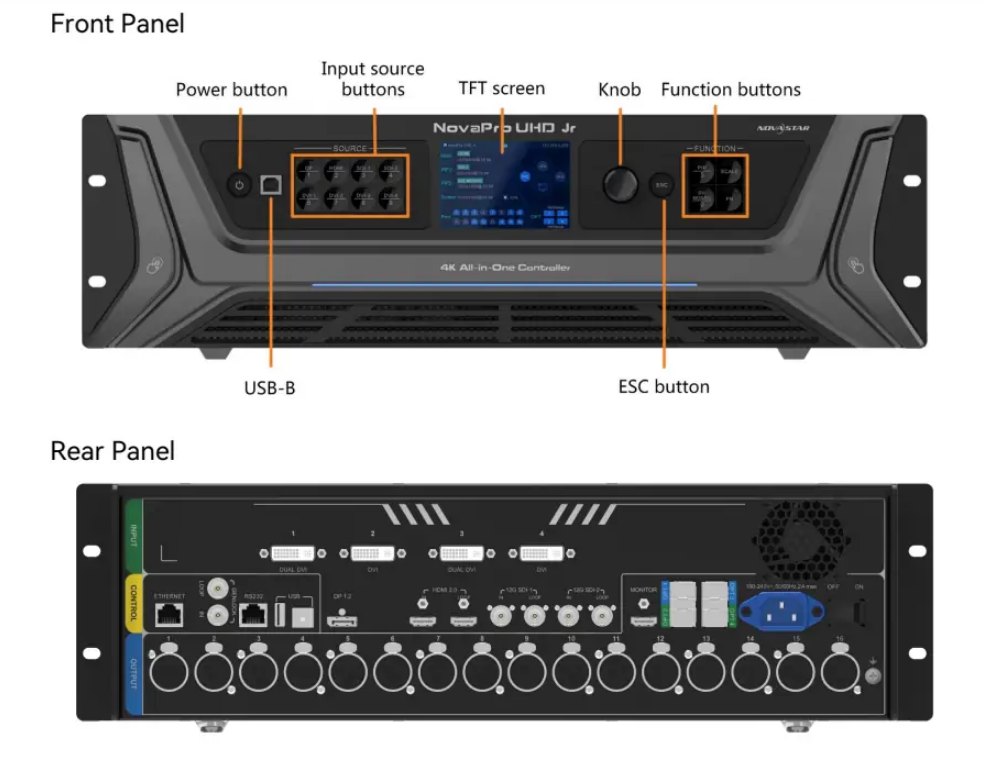
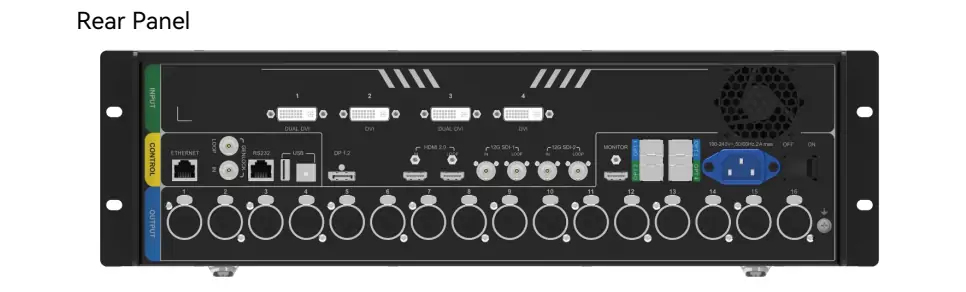
The NovaPro UHD Jr 4K LED Controller boasts an impressive array of input and output connectors:
- Inputs: 1x DP 1.2, 4x DVI, 1x HDMI 2.0 (with loop through), and 2x 12G-SDI (with loop through).
- Outputs: 16x Neutrik Ethernet ports and 4x optical fiber ports, supporting a total loading capacity of up to 10,400,000 pixels.
- Maximum Resolution: The controller supports resolutions up to 16K widthand 8K height, ensuring compatibility with even the largest LED screens.
2.2 Advanced Features
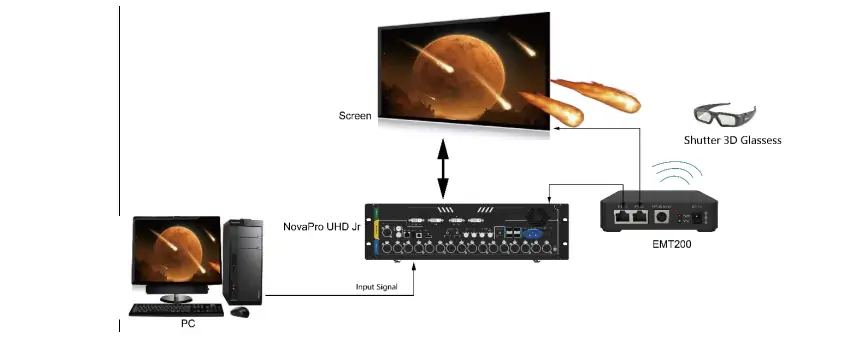
- 3D Mode: Enables immersive 3D visual experiences when paired with EMT200 3D transmitters and glasses. Note that enabling 3D mode reduces the output capacity by 50%.
- HDR Output: Enhances image quality with smoother gradations, finer details, and richer color density. This feature is supported with A8s/A10s receiving cards.
 100vw, 739px” data-dt-location=”https://www.eagerled.com/what-is-novapro-uhd-jr/hdr-output-of-novastar-novapro-uhd-jr-video-processor/” data-lazy-src=”https://www.eagerled.com/wp-content/uploads/2026/01/HDR-Output-of-Novastar-NovaPro-UHD-Jr-Video-Processor.webp” /></div>
</figure>
</div>
<div class= "HDR Output of Novastar NovaPro UHD Jr Video Processor LED Display Manufacturer in China EagerLED")
- HDR Output: Enhances image quality with smoother gradations, finer details, and richer color density. This feature is supported with A8s/A10s receiving cards.
- Customized BKG Settings: Allows users to set pure color or image backgrounds for enhanced visual appeal.
- Image Scaling Modes: Offers three scaling options—full screen, pixel-to-pixel, and custom—to suit different display requirements.
 100vw, 870px” data-dt-location=”https://www.eagerled.com/what-is-novapro-uhd-jr/bkg-setting-of-novapro-uhd-jr-all-in-one-controller/” data-lazy-src=”https://www.eagerled.com/wp-content/uploads/2026/01/BKG-Setting-of-NovaPro-UHD-Jr-All-in-One-Controller.webp” /></div>
</figure>
</div>
<div id= "BKG Setting of NovaPro UHD Jr AllinOne Controller LED Display Manufacturer in China EagerLED")
2.3 User-Friendly Design
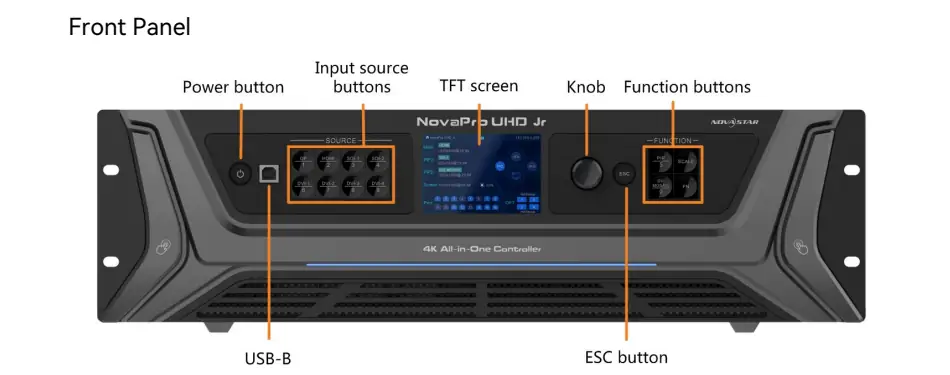
With up to 10 user presets, customizable layer priorities, and intuitive menu navigation via the front panel TFT screen, NovaPro UHD Jr ensures effortless operation. Additionally, its compact rack-mountable design (482.6mm × 396.5mm × 139.0mm) and lightweight build (6.3 kg net weight) make it highly portable and easy to integrate into any setup.
 100vw, 1000px” data-dt-location=”https://www.eagerled.com/novastar-vx2000-pro-review/novastar-vx2000-pro-osd-system/” data-lazy-src=”https://www.eagerled.com/wp-content/uploads/2025/10/NovaStar-VX2000-PRO-OSD-System.webp” /></div>
</figure>
</div>
</div>
</div>
</div>
</div>
<div id= "NovaStar VX2000 PRO OSD System LED Display Manufacturer in China EagerLED")
3. Novastar NovaPro UHD Jr Video Processor Compatibility
Novastar NovaPro UHD Jr Video Processor is engineered to work seamlessly with a variety of devices and systems. Here’s a breakdown of its compatibility:
3.1 Supported Resolutions and Frame Rates
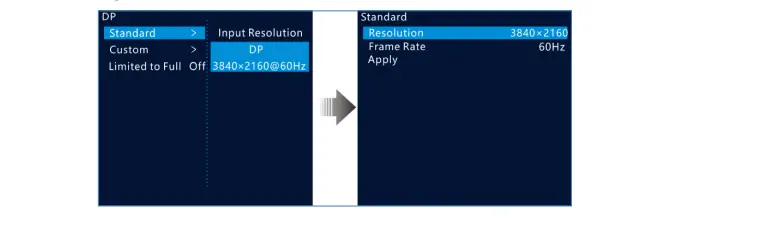
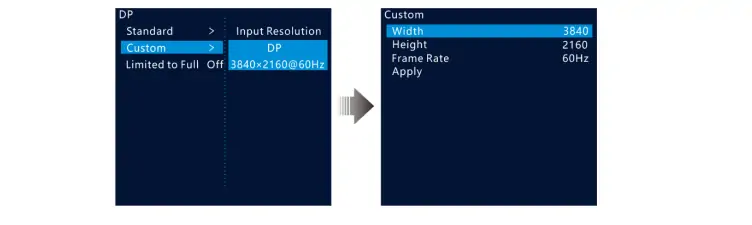
- Standard Resolutions: Includes popular formats like 1920×1080@60Hz, 3840×2160@60Hz, and 7680×1080@60Hz.
- Custom Resolutions: Users can define custom resolutions and frame rates within specified limits (e.g., 23.98 Hz–120 Hz).
3.2 Input Signal Types
- HDMI 2.0: Supports HDCP 2.2 compliance and EDID management.
- DP 1.2: Compatible with HDCP 1.3 and offers flexible resolution settings.
- 12G-SDI: Handles high-bandwidth video signals, including ST-2082-1 (12G), ST-2081-1 (6G), and ST-424 (3G).
3.3 Cascading and Mosaic Functionality
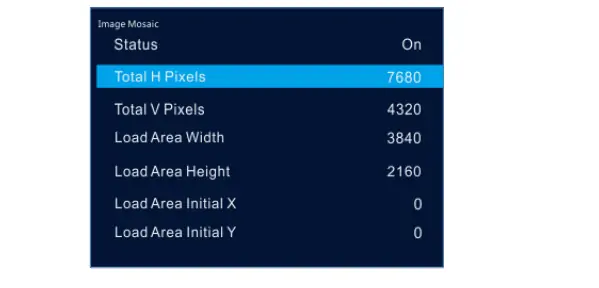
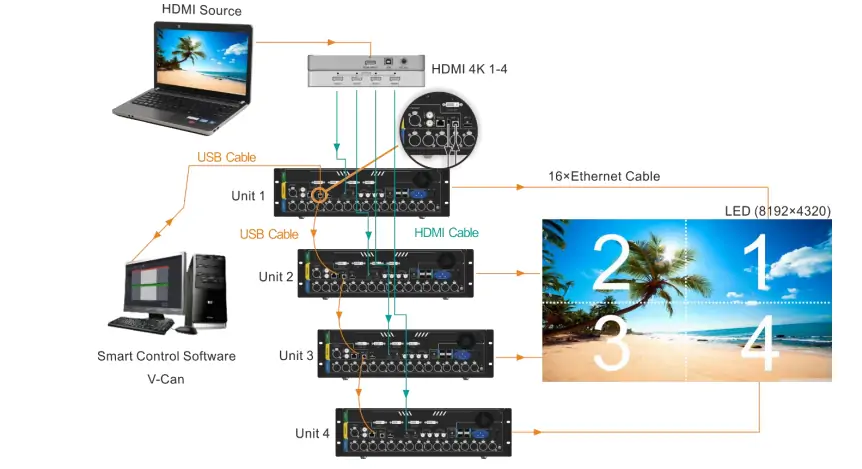
Up to four NovaPro UHD Jr units can be cascaded to drive a super-large LED screen. The image mosaic feature allows users to divide the screen into sections, each controlled by a separate unit, while maintaining synchronization across all devices.
3.4 Software Integration
The controller is fully compatible with V-Can and SmartLCT software, enabling advanced mapping, configuration, and web-based control. These tools simplify tasks like screen calibration, data flow setup, and real-time monitoring.
4. NovaPro UHD Jr All-in-One Controller Software & Resource Download
To maximize the potential of the NovaPro UHD Jr, Novastar provides a suite of software tools and resources:
4.1 Smart Control Software: V-Can
Key Features:
- Simplifies layer management and input source selection.
- Facilitates quick configuration of screen parameters.
- Enables advanced functions like HDR adjustment and low-latency optimization.
Download Link: Available on Novastar’s official website (novastar.tech).
4.2 Mapping Software: SmartLCT
- Purpose: Assists in creating precise screen layouts and configuring cabinet arrangements.
- Benefits: Reduces setup time and ensures accurate alignment of LED panels.
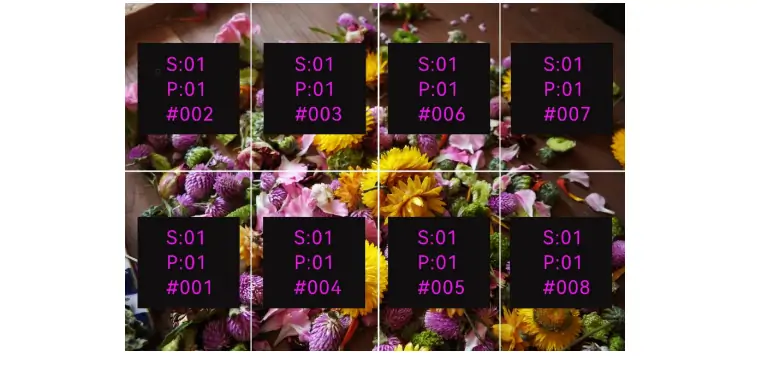
4.3 Firmware Updates
Regular firmware updates ensure the controller remains compatible with the latest technologies and resolves any known issues. Users can download the latest version from Novastar’s support portal.
4.4 Documentation
Novastar NovaPro UHD Jr Manual is an invaluable resource for understanding the device’s features and functionalities. It includes detailed instructions on setup, operation, and troubleshooting.
 100vw, 840px” data-dt-location=”https://www.eagerled.com/what-is-novapro-uhd-jr/preset-operation-of-novastar-uhd-jr/” data-lazy-src=”https://www.eagerled.com/wp-content/uploads/2026/01/Preset-Operation-of-Novastar-UHD-Jr.webp” /></div>
</figure>
</div>
</div>
</div>
</div>
</div>
<div id= "Preset Operation of Novastar UHD Jr LED Display Manufacturer in China EagerLED")
5. Novastar NovaPro UHD Jr Price
While the exact price of the NovaPro UHD Jr may vary depending on the region and distributor, it is positioned as a premium product within Novastar’s lineup. Given its advanced features, robust build quality, and extensive connectivity options, the controller represents excellent value for professionals seeking top-tier performance.
For accurate pricing information, interested buyers are encouraged to contact authorized Novastar dealers or visit their official website. Additionally, bulk purchase discounts and leasing options may be available for businesses requiring multiple units.
6. Novastar UHD Jr Troubleshooting
Despite its reliability, users may occasionally encounter issues with the NovaPro UHD Jr. Below are some common problems and their solutions:
Issue: No Signal Detected on Input Source
- Solution: Verify cable connections and ensure the input source matches the selected format. Adjust the input resolution and frame rate using the device menu.
Issue: Screen Flickering or Distorted Image
- Solution: Check the synchronization settings and ensure all connected devices are properly synced. Update the firmware if necessary.
Issue: Low Brightness or Poor Color Quality
- Solution: Calibrate the screen brightness and color settings using the Advanced Functions Enable HDR mode for improved image quality.
Issue: Device Not Responding
- Solution: Perform a factory reset to restore default settings. If the problem persists, consult NovaPro UHD Jr Manual or contact Novastar support.
7. Conclusion
NovaPro UHD Jr All-in-One Controller exemplifies Novastar’s commitment to innovation and excellence in LED display technology. With its unparalleled video processing capabilities, extensive input/output options, and user-friendly interface, this device is a game-changer for professionals in the AV industry. Whether you’re managing a small-scale event or orchestrating a massive exhibition, NovaPro UHD Jr delivers the performance and flexibility needed to bring your vision to life.