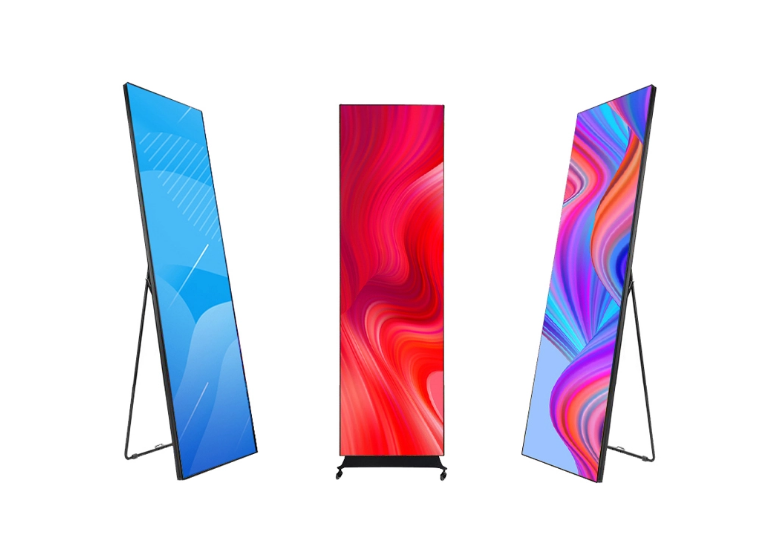
How to choose the most suitable LED poster?
Why LED Posters Are Worth Your Investment
Gone are the days of printing costly paper posters, waiting for deliveries, or struggling to update outdated information. LED Posters—thin, portable digital screens that display videos, photos, and text—have revolutionized how businesses, events, and even individuals share messages. Whether you’re a small café owner looking to modernize your menu, a retail manager aiming to boost sales with dynamic promotions, or an event planner needing flexible signage, an LED Poster can save time, cut long-term costs, and grab attention like no static poster can. But with so many options on the market—from budget-friendly indoor models to rugged outdoor screens—choosing the right one can feel overwhelming. The good news? You don’t need a background in tech to make a smart choice.
This guide breaks down everything you need to know, focusing on your real-world needs: where you’ll use it, what you’ll show, how you’ll use it, and how much you want to spend. By the end, you’ll have a clear roadmap to pick an LED Poster that works for you—no confusing jargon, just practical advice.
Step 1: Start with Your Environment—Indoor vs. Outdoor (and Everything In Between)
The first and most critical decision is where your LED Poster will live. Its location dictates three non-negotiable features: brightness, durability, and pixel density. Let’s break down the most common environments and what to look for in each.
Indoor Use: The Most Popular Choice (and Its Subtle Differences)
Indoor LED Posters are designed for spaces like stores, cafes, offices, hotels, and event halls. While they all share a focus on clarity and ease of use, different indoor settings have unique needs:
Bright Indoor Spaces (Store Windows, Malls, Sunlit Lobbies)
If your LED Poster will sit near large windows or in well-lit areas (like a mall hallway or a storefront facing the street), brightness is key. Sunlight streaming in can wash out dim screens, making your content invisible. Look for a brightness rating of 1,200–1,500 nits (a “nit” is the unit for brightness—think of it as “digital wattage”). For example, a clothing store’s window display needs enough brightness to compete with sunlight, so passersby can see your new collection video from the sidewalk. You’ll also want an anti-glare coating (many mid-range models include this) to reduce reflections—without it, the screen might look like a mirror on sunny days.
Low-Light Indoor Spaces (Cafés, Bars, Conference Rooms)
In dimmer environments, you don’t need ultra-high brightness—too much light can feel harsh and distracting. A brightness of 800–1,000 nits is perfect here. For instance, a café using an LED Poster as a digital menu should prioritize warm color accuracy (we’ll cover this later) over raw brightness, so food photos look appetizing without straining customers’ eyes. Similarly, a conference room screen needs to be easy to read during presentations but not so bright that it competes with projectors or causes eye fatigue.
Tight or High-Traffic Indoor Spaces (Pop-Up Shops, Event Booths)
If you’re short on space or need to move the screen often (like a pop-up shop owner or event planner), portability and size matter. Opt for a vertical screen (9:16 or 3:4 ratio) in 32–43 inches—this size is compact enough to fit in small booths but large enough to be seen from a few feet away. Look for models under 10kg (22 lbs) with a built-in stand—you’ll avoid the hassle of carrying heavy brackets or hiring installers.

LED Posters for Indoor Use
Outdoor Use: Durability and Weather Resistance Are Non-Negotiable
Outdoor LED Posters are built to withstand rain, dust, extreme temperatures, and direct sunlight—but not all are created equal. If you’re using the screen outside (e.g., street-level advertising, outdoor events, or parking lot signage), here’s what to prioritize:
Brightness: Beat the Sun
Outdoor screens need to cut through direct sunlight, so aim for 3,000–5,000 nits. Anything lower will look faded, even on cloudy days. For example, a restaurant’s outdoor patio menu or a festival’s directional sign needs to be visible from 10–15 feet away, even in midday sun.
Weatherproof Rating: Look for IP65 or Higher
The “IP rating” (Ingress Protection) tells you how well the screen resists dust and water. For outdoor use, IP65 is the minimum—this means it’s dust-tight and protected against low-pressure water jets (like rain or sprinklers). If you live in a rainy or snowy area, or if the screen will be exposed to heavy splashing (e.g., near a pool or fountain), go for IP66. Avoid any outdoor screen with an IP rating below IP65—moisture or dust will ruin the internal components over time.
Temperature Resistance
Outdoor screens face extreme heat (over 100°F/38°C) and cold (below 0°F/-18°C) depending on your location. Look for models rated to operate between -20°C to 50°C (-4°F to 122°F)—this covers most climates. Cheaper outdoor models may only handle 0°C to 40°C, which could fail in harsh winters or summers.

LED Posters for Outdoor Use
Step 2: What Will You Display? Match the Screen to Your Content
Your LED Poster’s performance depends on what you’ll show on it. A screen that’s perfect for static photos might struggle with smooth videos, and a basic model won’t handle interactive content. Let’s break down common content types and their specific requirements:
Static Content (Photos, Text, Logos)
If you’re mainly displaying static images—like a bakery’s daily specials, a hotel’s amenities list, or a brand logo—you can focus on resolution and color accuracy rather than advanced features. For close-up viewing (e.g., a reception desk sign), choose a small pixel pitch (P1.5–P2) for sharp text and crisp images. For farther viewing (e.g., a mall directory), P2–P3 works well. Color accuracy is key here too—look for a screen with 16.7 million colors (standard for most models) and a high color gamut (sRGB 90%+), so your brand colors look true to life. For example, a luxury jewelry store’s logo should appear rich and vibrant, not washed out or distorted.
Dynamic Content (Videos, Animations, Slideshows)
Videos and animations are where LED Posters shine—but they require a few extra features to look smooth. First, resolution: 1080p (1920×1080) is the minimum for clear video playback. Avoid 720p (1280×720) if you’re showing detailed videos (like product demos or movie trailers)—the image will look pixelated. Second, refresh rate: Aim for 60Hz (frames per second) to avoid blurriness during fast-moving scenes (e.g., a fashion show video or a sports bar’s highlight reel). Some budget models only offer 30Hz, which works for slow-paced content but looks choppy for action. Third, content format support: Make sure the screen plays common file types (MP4, MOV, JPG, PNG)—most do, but double-check if you’re using less common formats (like GIFs or AVIs).
Interactive Content (Touch Screens, QR Codes, User Input)
If you want customers to interact with your LED Poster—like a touchscreen menu where they can browse options, a QR code for social media follows, or a survey for feedback—you’ll need specialized features. For touchscreens, look for multi-touch support (2–10 points) so multiple people can use it at once (e.g., a mall directory where two shoppers search different stores). The touch response time should be under 10ms (milliseconds) for a smooth experience—laggy touchscreens frustrate users. For QR codes or interactive links, ensure the screen has Wi-Fi/4G connectivity (more on this later) so you can update the codes remotely (e.g., changing a QR code for a new promotion without physically accessing the screen).
Ongoing Content Updates: How Often Will You Change Things?
This is a make-or-break factor for many buyers. If you update content once a month (e.g., a seasonal menu), a basic model with USB support is fine—just plug in a USB drive with new files, and the screen plays them automatically. But if you update content daily (e.g., a retail store’s flash sales) or manage multiple screens (e.g., a chain of coffee shops), Wi-Fi/4G connectivity is non-negotiable. With internet access, you can:
- Update content from your phone, laptop, or tablet (no need to visit each screen)
- Schedule playlists (e.g., show breakfast menus in the morning, dinner menus at night)
- Monitor screen status (check if it’s on, low on power, or having technical issues)
- Push emergency updates (e.g., closing early due to bad weather)
Some high-end models even offer 5G support for faster updates and better connectivity in remote areas (e.g., outdoor events with weak Wi-Fi). For most users, Wi-Fi is sufficient—but 4G is a great backup if your space has spotty internet.
Step 3: Practical Needs That Save You Time and Headaches
Beyond brightness and content, there are practical features that make your LED Poster easy to use, install, and maintain. These are often overlooked but can drastically improve your experience—especially if you’re not tech-savvy.
Installation: Choose the Right Mount for Your Space
LED Posters offer three main installation options—pick one that fits your space and mobility needs:
- Floor-Standing: Ideal for temporary use (events, pop-ups) or spaces where you can’t drill holes (rented stores, hotels). Look for models with a sturdy, adjustable stand—some stands even have wheels for easy moving. Floor-standing screens are great for high-traffic areas (e.g., a mall’s center court) but take up more space.
- Wall-Mounted: Perfect for permanent spots (café menus, office lobbies) where you want to save floor space. Most models come with VESA mounting brackets (standard for screens), so you can use any compatible wall mount. Ensure the wall is strong enough—larger screens need reinforced walls to avoid accidents.
- Ceiling-Mounted: Rare for LED Posters but useful in tight spaces (e.g., narrow hallways or small retail stores). Ceiling mounts free up both floor and wall space but require professional installation to ensure safety.
Pro tip: If you’re unsure about installation, ask the seller if they offer setup services—many do for a small fee, and it’s worth avoiding the hassle of DIY mistakes.
Multiple installation methods for LED Posters
Power: Plug-In vs. Battery-Powered
Most LED Posters are plug-in (AC power), which is reliable for permanent use. But if you need a screen for events, pop-ups, or areas without power outlets (e.g., a park event), consider a battery-powered model. Look for a battery life of 4–8 hours (depending on brightness—higher brightness drains the battery faster). Some battery models also have solar charging options for outdoor use, which saves on electricity costs. Keep in mind: battery-powered LED Posters are more expensive than plug-in ones, but they offer unbeatable flexibility.
Maintenance: Keep Your Screen Running Smoothly
LED Posters are low-maintenance, but a few simple steps will extend their lifespan (which is already 50,000+ hours—about 5 years of daily use!):
- Cleaning: Use a soft, dry microfiber cloth to wipe dust off the screen. For smudges, dampen the cloth with water (no harsh chemicals—they can damage the anti-glare coating).
- Cooling: Ensure the screen has proper ventilation—don’t block the vents with furniture or decorations. Overheating can shorten the LED lifespan, especially for outdoor models.
- Warranty: Always choose a model with a 2–3 year warranty (standard for reputable brands). Cheaper models may only offer 1 year, which is risky if components fail. Look for warranties that cover parts and labor—some brands even offer on-site service for large orders.
User-Friendliness: Can Anyone Operate It?
If you’re not tech-savvy, or if your staff will be using the screen (e.g., a café’s servers updating the menu), ease of use is crucial. Look for these features:
- A simple control panel or remote (no complicated buttons)
- A mobile app or web dashboard with a user-friendly interface (for remote updates)
- Plug-and-play USB support (insert a USB drive, and the screen starts playing automatically)
- Clear instructions or customer support (some brands offer 24/7 help for technical issues)
Avoid models with overly complex software—you don’t want to spend hours troubleshooting just to change a menu item.

Content Control Methods for LED Poster Display
Step 4: Budget Breakdown—Find the Right Balance of Price and Features
LED Posters range in price from 1,000 to 10,000+, but you don’t need to spend a fortune to get a great screen. Your budget should align with your use case—here’s a detailed breakdown of what you get at each price point:
Entry-Level (1,000–2,500): Perfect for Small Businesses and Hobbyists
This is the sweet spot for small shops, cafes, home users, or anyone testing LED Posters for the first time. Key features include:
- Indoor use only (800–1,000 nits)
- Pixel pitch: P2–P3 (sharp enough for close viewing)
- Size: 24–43 inches (vertical)
- Basic resolution (1080p for videos, 720p for smaller screens)
- 1–2 year warranty
Who it’s for: A local bakery showing daily specials, a freelance artist displaying their work, or a home user using it as a digital photo frame. For low-volume use, it’s a cost-effective choice.
Mid-Range (2,500–5,000): The Most Versatile Option
This is the most popular price range for businesses—retail stores, hotels, event companies, and restaurants. You get a balance of performance and features:
- Indoor or outdoor (IP65 for outdoor models)
- Brightness: 1,200–3,000 nits
- Pixel pitch: P1.5–P3 (sharper images)
- Wi-Fi connectivity (remote updates and scheduling)
- 1080p resolution and 60Hz refresh rate (smooth videos)
- 2–3 year warranty
- Optional features: anti-glare coating, portable stand
Who it’s for: A clothing store’s window display, a hotel’s lobby information screen, an event planner’s portable signage, or a café with a digital menu. This range offers the best value—you get all the essential features without overpaying for extras you don’t need.
High-End ($5,000+): For Professional and Large-Scale Use
High-end models are designed for luxury brands, malls, large events, or businesses with specific needs (e.g., interactive content or 24/7 use). Key features include:
- Outdoor-ready (IP65+ weatherproofing)
- Brightness: 4,000–5,000 nits (for extreme sunlight)
- Pixel pitch: P1.86-P2.5(ultra-sharp for close-up viewing)
- Size: larger, with seamless splicing
- 5G/Wi-Fi/4G connectivity (fast, reliable updates)
- 4K resolution (for detailed videos or large screens)
- 3–5 year warranty
Who it’s for: A luxury jewelry store’s flagship window, a mall’s digital directory with multiple screens, a music festival’s outdoor stage backdrop, or a corporate headquarters’ lobby interactive display. The high price tag gets you durability, advanced features, and peace of mind for heavy use.
Budget-Saving Tips
- Buy in bulk: If you need multiple screens (e.g., a chain of 10 coffee shops), most brands offer discounts for bulk orders.
- Skip unnecessary features: If you don’t need touchscreen or 5G, stick to mid-range models—you’ll save thousands.
Rent first: If you only need an LED Poster for a short event (e.g., a 3-day trade show), renting is cheaper than buying (rental prices usually start at 100–300 per day).
Tailored Recommendations for Common Users
To make it even easier, here are personalized recommendations for the most common buyers—no guesswork required:
1. Small Business Owner (Café, Bakery, Local Shop)
- Needs: Budget-friendly, easy to update, fits in a small space.
- Best Choice: Mid-range indoor model (P2-P3 pixel pitch, Wi-Fi).
- Key Features: 1,000–1,200 nits (bright enough for windows), USB + Wi-Fi updates (change menus/specials remotely), floor-standing or wall-mounted.
- Example Use: Display daily specials, new products, or customer reviews—update content in 2 minutes from your phone.
2. Retail Store Manager (Clothing, Beauty, Digital Products)
- Needs: Eye-catching, brand-aligned, dynamic content support.
- Best Choice: Mid-range to high-end indoor model (P1.5–P3 pixel pitch).
- Key Features: 1,200–1,500 nits (anti-glare coating for windows), 1080p resolution (for product videos), Wi-Fi scheduling (show morning promotions in the AM, evening sales at night).
- Example Use: Play fashion show clips, product demos, or user-generated content—keep customers engaged while they shop.
3. Event Planner (Trade Shows, Weddings, Festivals)
- Needs: Portable, durable, easy to set up.
- Best Choice: Mid-range portable model (floor-standing, indoor/outdoor dual-use, foldable options).
- Key Features: Lightweight (under 15kg), IP65 weatherproofing (for outdoor events), battery-powered option (no power outlets), quick setup (10 minutes or less).
- Example Use: Display event schedules, speaker bios, or wedding photos—move the screen between venues without hassle.
4. Chain Brand Manager (Multiple Locations)
- Needs: Centralized management, consistent branding, reliable performance.
- Best Choice: High-end indoor/outdoor models (Wi-Fi/4G).
- Key Features: Cloud-based content management (update all screens at once), screen monitoring (check status remotely), seamless splicing (for large displays), 3-year warranty.
- Example Use: Roll out a new promotion across 50 stores in 1 click—ensure all locations have the same content, no errors.

Multiple Application Scenarios of LED Posters
Common Mistakes to Avoid (Save Yourself Time and Money!)
Even with the best intentions, buyers often make these mistakes—here’s how to steer clear:
- Buying an outdoor model for indoor use: Outdoor screens are heavier, more expensive, and brighter than needed—you’ll waste money on features you don’t use.
- Choosing a screen that’s too small (or too big): Measure your area first, and consider viewing distance (screen size should be 1/4–1/6 of the viewing distance).
- Ignoring connectivity: If you update content more than once a month, Wi-Fi is a must—USB-only models will become a hassle.
- Prioritizing pixel pitch over viewing distance: A P3 pixel pitch is fine for a screen viewed from 10 feet away—you don’t need ultra-expensive P1.25 unless viewers are standing 2–3 feet away.
- Forgetting installation needs: Don’t buy a wall-mounted model if you can’t drill holes in your rented space—opt for floor-standing instead.
- Skimping on warranty: A 1-year warranty might seem okay, but LED Posters are long-term investments—spend a little more for a 2–3 year warranty to cover unexpected issues.
Final Tips for Success
Once you’ve chosen your LED Poster, follow these tips to get the most out of it:
- Optimize your content for vertical screens: Most LED Posters are vertical (9:16 ratio), so avoid using horizontal videos (they’ll have black bars on the top and bottom). Use apps like Canva to create vertical content easily.
- Test brightness in your space: Before finalizing the purchase, ask the seller for a demo or sample—test it in your actual environment to ensure it’s bright enough (no glare, no fading).
- Schedule content strategically: Show high-energy videos during peak hours (e.g., lunchtime for cafes) and calm, informative content during off-peak times.
- Clean regularly: Dust and smudges make your screen look unprofessional—wipe it down once a week with a microfiber cloth.
Wrap-Up
Choosing the perfect LED Poster isn’t about picking the most expensive or feature-packed model—it’s about finding one that fits your environment, content, and budget. By starting with “where will I use it?” and “what will I show?“, you’ll narrow down your options quickly. Remember: the best LED Poster is the one that’s easy to use, meets your needs, and helps you achieve your goals—whether that’s boosting sales, impressing customers, or sharing your creativity.