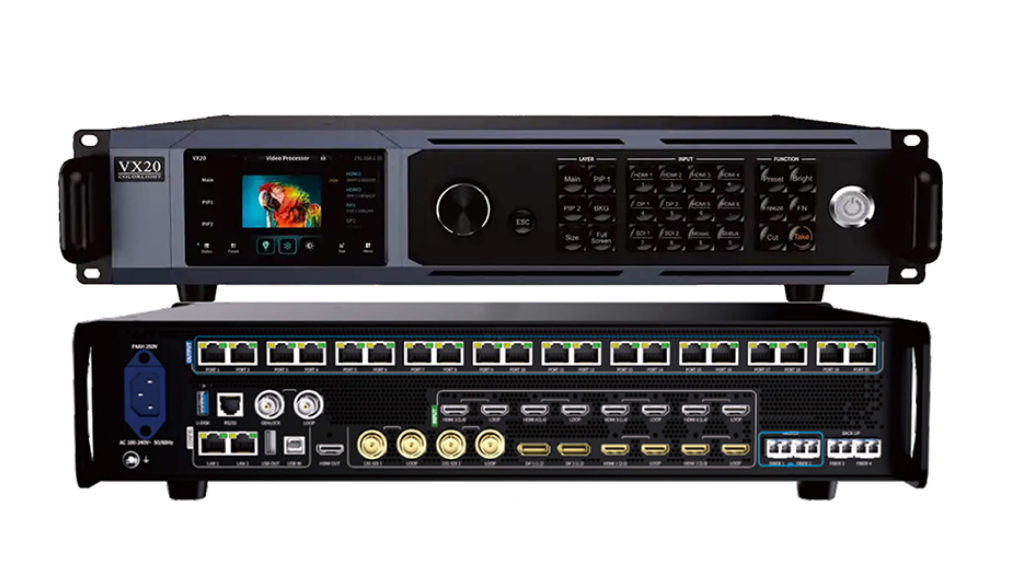
Colorlight VX20 LED Video Controller: An In-Depth Analysis of Core Functions, Technical Specifications and Industry Applications
The Colorlight VX20 LED Video Controller is a state-of-the-art solution designed for professionals in the LED display industry. Whether you’re managing large-scale events, exhibitions, or stage rentals, this device offers unparalleled performance and flexibility.
1.What Is the Colorlight VX20 LED Video Controller?
The Colorlight VX20 is a cutting-edge LED video controller that excels in processing capabilities and versatility. It supports up to 13 million pixels, with a maximum width of 16,384 pixels and height of 8,192 pixels, making it ideal for medium-to-high-end rental scenarios and fine-pitch LED screens.
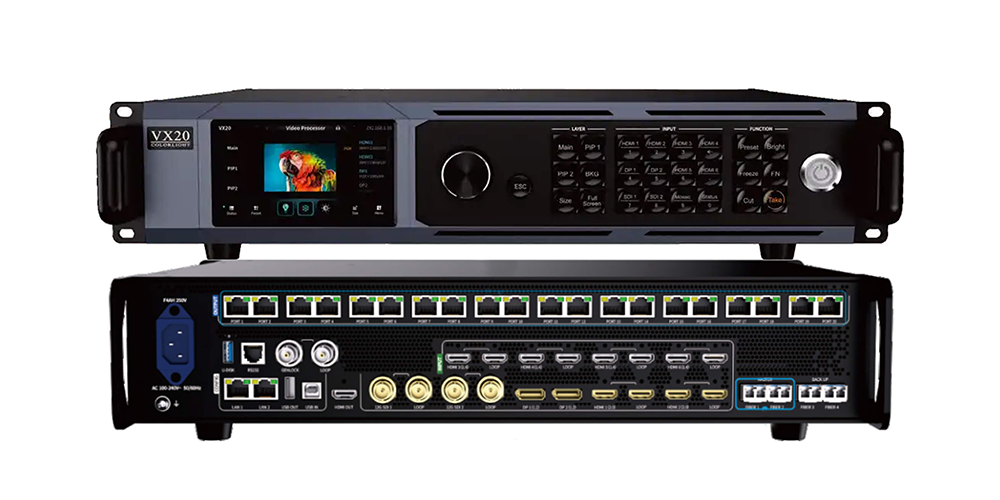
This device operates in three distinct modes:
- Video Processor Mode: Processes multiple video inputs and outputs them to receiving cards with minimal delay.
- Fiber Optic Transceiver Mode:Acts as a fiber optic transceiver, enabling seamless signal transmission over long distances.
- Bypass Mode:Outputs one selected video input directly to the screen without any frame delay.
With support for HDR technology, 8/10/12-bit video input, and 8/10-bit output, the Colorlight VX20 ensures exceptional image quality. Its compatibility with Windows, macOS, and Linux through a web-based interface further enhances usability.
2.Colorlight VX20 Appearance
2.1 Front Panel Features
 100vw, 1000px” data-dt-location=”https://www.eagerled.com/colorlight-vx20-led-video-controller/colorlight-vx20-2/” data-lazy-src=”https://www.eagerled.com/wp-content/uploads/2026/01/Colorlight-VX20-2.png” /></div>
</figure>
</div>
<div class= "Colorlight VX202 LED Display Manufacturer in China EagerLED")
| Feature | Description |
| Touch Screen | Displays device status and provides menus for navigation and control. |
| Knob | Used for parameter tuning, menu navigation, and confirming selections. |
| ESC Button | Exits the current interface or returns to the previous one. |
| Layer Operation | Buttons like Main, PIP1, PIP2, BKG, SIZE, and Full Screen allow layer management. |
| Input Control | Buttons for HDMI, DP, SDI, Mosaic, and numeric entry enable quick source selection. |
| Function Buttons | Preset, Brightness, Freeze, FN, Cut, and Take buttons offer advanced controls. |
| Power Switch | Turns the device on or off. |
2.2 Rear Panel Features
 100vw, 1000px” data-dt-location=”https://www.eagerled.com/colorlight-vx20-led-video-controller/colorlight-vx20-1/” data-lazy-src=”https://www.eagerled.com/wp-content/uploads/2026/01/Colorlight-VX20-1.png” /></div>
</figure>
</div>
<div class= "Colorlight VX201 LED Display Manufacturer in China EagerLED")
| Port | Functionality |
| LAN1/LAN2 | Gigabit Ethernet ports for PC connection and VLAN cascading. |
| USB IN & OUT | USB 2.0 ports for configuration and cascading. |
| RS-232 | RJ11 connector for central controller integration. |
| GENLOCK & LOOP | Sync signal input and loop-out via BNC connectors. |
| 12G-SDI | Handles 4K@60Hz video input with HDR and custom resolution support. |
| DP 1.2 | Supports high-resolution video input with advanced color depth. |
| HDMI 2.0 | Supports 4K@60Hz video input with loop-out and embedded audio. |
| HDMI 1.4 | Handles lower resolutions (up to 4K@30Hz) with loop-out. |
| Ethernet Ports | 20 Gigabit Ethernet ports for high-capacity data transmission. |
| Fiber Ports | 4×10G fiber ports with redundancy and backup configurations. |
| HDMI OUT | Outputs 2K/4K images for previewing PVW/PGM content. |
| AC Power Input | Accepts universal voltage (100-240V, 50/60Hz). |
2.3 Dimensions and Weight
 100vw, 1000px” data-dt-location=”https://www.eagerled.com/colorlight-vx20-led-video-controller/colorlight-vx20-4/” data-lazy-src=”https://www.eagerled.com/wp-content/uploads/2026/01/Colorlight-VX20.png” /></div>
</figure>
</div>
<div class= "Colorlight VX20 LED Display Manufacturer in China EagerLED")
- Device Size: 6mm × 88.0mm × 412.1mm (2U rack mountable).
- Weight:Net weight: 5.65kg; Gross weight: 9.10kg.
3.Colorlight VX20 Specifications
Understanding the technical capabilities of the Colorlight VX20 is crucial for determining its suitability for your project. Below is a detailed breakdown of its key specifications:
| Category | Specification |
| Max Input Resolution | 3840×2160 @60Hz (4K UHD) |
| Min Input Resolution | 800×600 @60Hz |
| Custom EDID Support | Yes – up to 4096 pixels wide/tall |
| Color Depth | 8-bit |
| Input Refresh Rates | 23.98 Hz to 120 Hz |
| Color Formats | RGB, YCbCr 4:4:4, YCbCr 4:2:2 |
| HDR Support | No |
| Interlaced Signals | Not supported |
| HDCP Compliance | HDCP 1.4 (on HDMI inputs) |
| Audio Input | HDMI 3 only |
Practical Implications:
- The VX20 accepts standard 4K signals via HDMI 2.0 or DisplayPort 1.2, making it compatible with most modern media servers, cameras, and laptops.
- Custom EDID support allows for non-standard resolutions, such as ultra-wide or portrait-oriented walls, catering to creative LED setups.
- While it lacks HDR and interlaced video support, these limitations rarely affect professional staging environments dominated by progressive, SDR content.
- Audio is passed through only on HDMI 3, which is useful for monitoring but not for multi-channel audio routing.
4.Key Features of the Colorlight VX20
The Colorlight VX20 combines advanced functionality with user-friendly design, making it a standout choice for professionals. Here are its key features:
4.1 Three Operating Modes
- Video Processor Mode:Processes up to three inputs (Main + PIP1 + PIP2) with just 1-frame latency, ideal for dynamic stage visuals.
- Bypass Mode:Provides zero-latency, pixel-perfect pass-through for critical feeds like camera returns or IMAG.
- Fiber Transceiver Mode: Extends signals over long distances using fiber optics.
 100vw, 1000px” data-dt-location=”https://www.eagerled.com/colorlight-vx20-led-video-controller/colorlight-vx20-application-1-2/” data-lazy-src=”https://www.eagerled.com/wp-content/uploads/2026/01/Colorlight-VX20-Application-1-1.png” /></div>
</figure>
</div>
<div class= "Colorlight VX20Application1 LED Display Manufacturer in China EagerLED")
4.2 Built-in Redundancy
- Dual-unit failover ensures continuity if one unit fails.
- Dual SFP+ fiber ports allow signal duplication or backup paths.
- Dual Gigabit Ethernet ports maintain network control during cable faults.
4.3 Web-Based Control
Access the full interface from any device on the same network using a browser—no proprietary software required. This makes configuration easy from a laptop backstage or a tablet in the control booth.
4.4 Background & OSD Management
Upload custom background images or set solid colors for clean standby screens. Add scrolling text overlays (OSD) with adjustable speed, direction, opacity, and position for branding or event information.
4.5 HDMI Monitoring Output
The front-panel HDMI OUT shows PVW, PGM, and all input sources simultaneously, providing immediate visual feedback without needing a separate multiviewer.
5.How the Colorlight VX20 Enhances Your LED Display Setup
The Colorlight VX20 isn’t just about handling signals—it directly improves reliability, flexibility, and operational efficiency in real-world LED deployments.
5.1 Enables True 4K Input for Large-Scale Walls
Many LED processors downscale 4K sources to HD, resulting in quality loss. The VX20 accepts native 3840×2160@60Hz input and maps it pixel-accurately across your LED array, ensuring pristine visuals for high-resolution media servers or broadcast feeds.
5.2 Reduces On-Site Complexity
With built-in layering (Main + PIP1 + PIP2), you can overlay graphics, lower-thirds, or backup cameras without external switchers or mixers. This simplifies cabling, reduces points of failure, and cuts setup time—especially valuable in fast-turnaround rental scenarios.
5.3 Eliminates Single Points of Failure
The VX20 includes multiple redundancy layers:
- Dual-unit failover ensures continuity if one unit fails.
- Fiber 3/4 ports provide backup data paths in fiber transceiver mode.
- Dual LAN ports maintain network control even if one cable is damaged.
These features prevent costly blackouts during live performances or broadcasts.
5.4 Speeds Up Troubleshooting and Control
The web UI lets operators adjust scaling, position, or source selection from any device on the network. Need to swap a camera feed mid-event? Just open a browser on your phone—no need to climb scaffolding.
5.5 Supports Clean Standby and Branding
When no program signal is active, the VX20 can display a custom background or solid color—no blank screen or “no signal” message. You can also add scrolling text via OSD, turning idle time into a branding opportunity.
6.Step-by-Step Configuration Guide for Colorlight VX20
Configuring the Colorlight VX20 LED Video Controller involves several steps to ensure optimal performance. Below is a step-by-step guide:
Step 1: Initial Setup
1.Connect the Colorlight VX20 to a power source using the provided AC power cord.
2.Turn on the device using the power switch located on the front panel.
3.Use the touch screen to navigate to the initial setup menu.
Step 2: Network Configuration
1.Connect your PC to the Colorlight VX20 using an Ethernet cable via LAN1 or LAN2.
2.Access the web-based interface by entering the default IP address (168.1.100) in your browser.
3.Configure network settings such as static/dynamic IP addresses and subnet masks.
Step 3: Input Signal Selection
1.Navigate to the Input Settings section in the web app.
Select the desired input source (HDMI 2.0, DP 1.2, 12G-SDI, etc.) based on your requirements.
2.Adjust input parameters like resolution, color depth, and frame rate.
Step 4: Output Configuration
1.Go to the Output Settings.
2.Choose between Ethernet ports (1G) or fiber ports (10G) for output.
3.Assign specific ports to different sections of the LED display.
Step 5: Advanced Image Processing
1.Enable HDR10/HLG for enhanced dynamic range.
2.Use the cropping and scaling tools to adjust video sources.
3.Set up Picture-in-Picture (PiP) or multi-layer displays if needed.
Step 6: Save Presets
1.Create presets for frequently used configurations.
2.Label each preset clearly for easy identification.
3.Test the presets to ensure they work as expected.
7.Applications of Colorlight VX20 LED Video Controller
The Colorlight VX20 finds application in various industries due to its versatility and reliability. Here are six notable use cases:
- Stage Rentals:Ideal for concerts and live performances requiring dynamic visuals.
- Commercial Events:Perfect for product launches and corporate presentations.
- Exhibitions:Enhances trade shows with interactive displays.
- Broadcast Studios:Provides high-quality video processing for TV production.
- Retail Spaces: Creates immersive advertising experiences.
- Sports Arenas: Powers large LED scoreboards and perimeter boards.
8.FAQs About Colorlight VX20
Q1:What is the price of the Colorlight VX20?
The Colorlight VX20 price varies depending on region and distributor. Contact authorized dealers for accurate pricing.
Q2:How do I troubleshoot common issues?
Refer to the troubleshooting tips section above for guidance
Q3:Can I upgrade the firmware?
Yes, firmware updates are available via the official website.
9.Conclusion
The Colorlight VX20 LED Video Controller is a powerhouse designed to meet the demands of modern LED display applications. With its advanced features, robust build, and user-friendly interface, it sets a new standard in the industry. By understanding its capabilities and following this guide, you can unlock the full potential of the Colorlight VX20 and deliver stunning visual experiences.
Whether you’re managing a concert, exhibition, or broadcast studio, the Colorlight VX20 ensures seamless performance and exceptional image quality. Explore its features today and elevate your LED display projects to the next level!