NovaStar TCC160 Control Card Comprehensive Review: Full Specifications and Practical Analysis
Managing your LED display shouldn’t require a complex setup of separate hardware. The NovaStar TCC160 simplifies everything by integrating the sending and receiving functions into a single, powerful control card. This blog will break down its key features—from easy remote control to 4K playback—and show how it stacks up against traditional options like the HD-C16C and 5A-75B, helping you choose the right tool for your project.
1.What is the NovaStar TCC160 control card
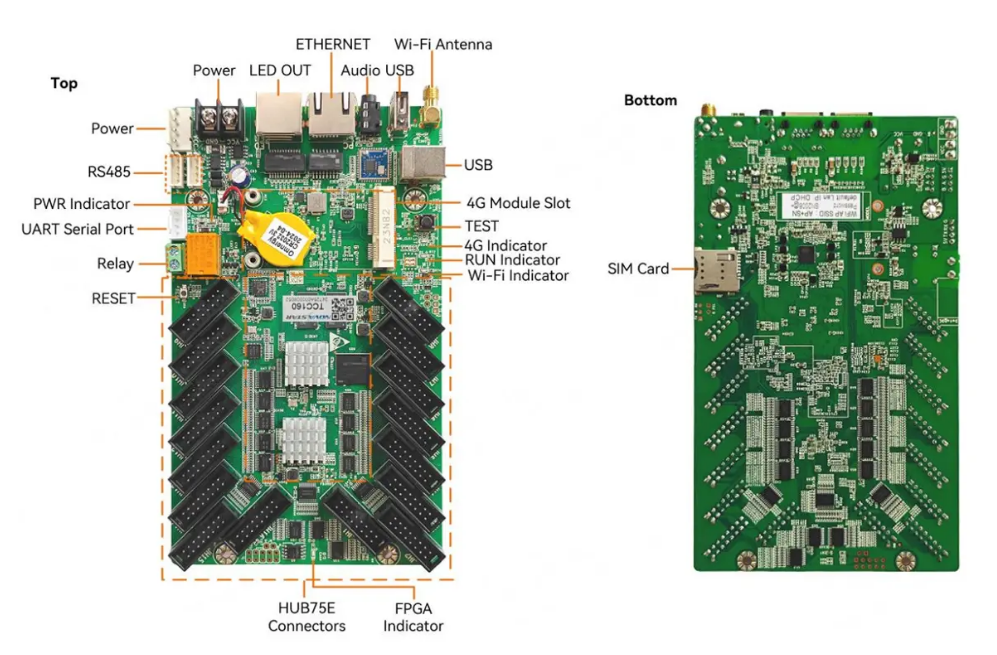
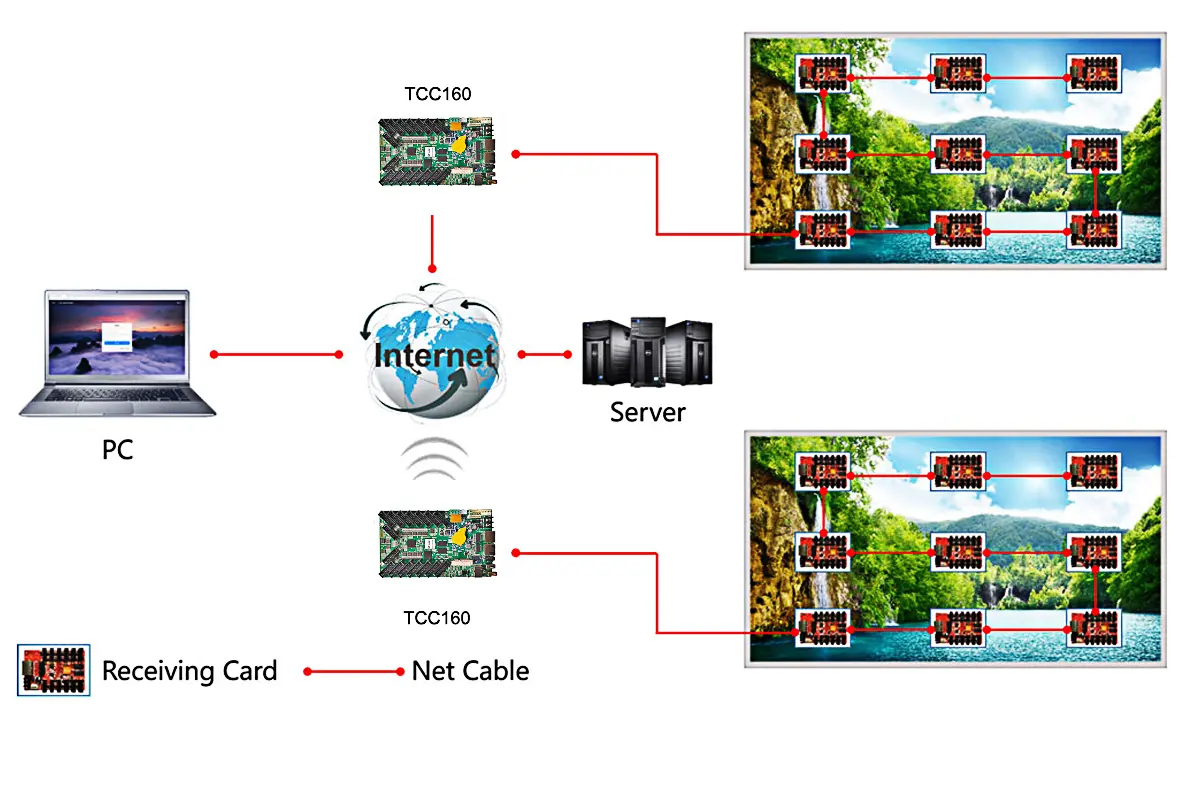
The NovaStar TCC160 is an asynchronous full-color LED display control card designed for modern digital signage needs. It combines sending and receiving capabilities, enabling users to publish content and manage displays remotely via cloud platforms. With its robust hardware and software design, the TCC160 simplifies setup, ensures stable operation, and facilitates efficient maintenance.
Key highlights include:
- Integrated Wi-Fi and Ethernet connectivity
- Support for ultra-long screens (up to 8192 pixels wide)
- Compatibility with PWM and general driver ICs
- Advanced color management and gamma adjustment
This control card is ideal for small-to-medium pixel capacity applications, making it perfect for storefronts, vehicle-mounted displays, and community information boards.
2. NovaStar TCC160 control card Specifications
| Feature | Details |
| Pixel Capacity | Up to 512×512@60Hz for PWM ICs; supports cascading for up to 650,000 pixels |
| Media Decoding | Hardware decoding of 4K videos |
| Wi-Fi Connectivity | Dual Wi-Fi AP and STA modes |
| Audio Output | Stereo audio support |
| Color Management | Standard (Rec.709 / DCI-P3 / Rec.2020) and custom color gamuts |
| Remote Monitoring | Real-time temperature, voltage, and bit error monitoring |
| Relay Functionality | Remote power on/off control |
Additionally, the TCC160 control card integrates seamlessly with NovaStar’s ecosystem, including products like the NovaStar VX1000 Pro and NovaStar VX1000, making it a versatile choice for advanced video wall controllers.
3.Why Do Your LED display Need TCC160 control card?
TCC160 is not just another control card—it’s a game-changer for LED display management. Here’s why your LED displays need it:
Simplified Setup and Maintenance
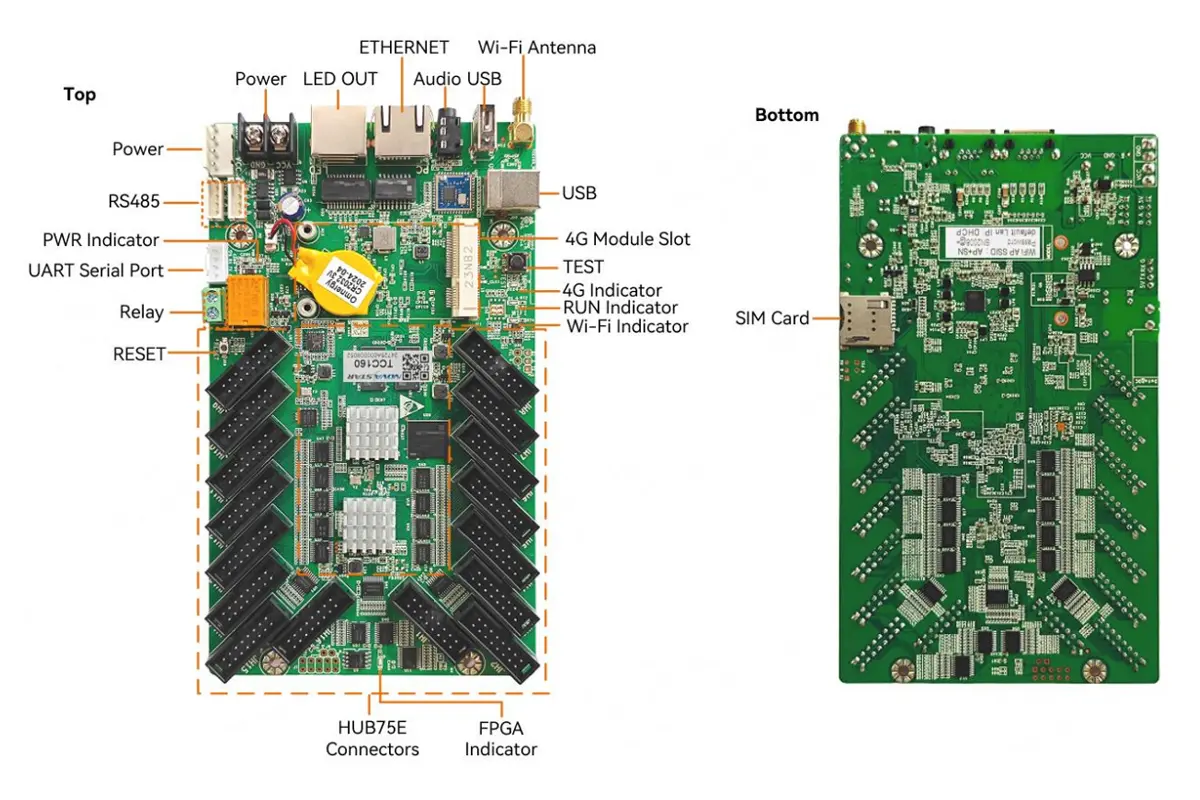
With 16 standard HUB75E connectors and integrated sending/receiving capabilities, the TCC160 eliminates the need for additional hardware. Its compact design saves space and reduces cabling complexity.
Superior Performance
Equipped with a quad-core 1.4 GHz processor, 2 GB RAM, and 32 GB internal storage, the TCC160 delivers flawless playback of high-resolution videos and images. It also supports hardware decoding of 4K videos, ensuring smooth performance even under heavy loads.
Remote Accessibility
Using cloud-based platforms, you can manage your LED displays from anywhere in the world. The built-in Wi-Fi and optional 4G module provide flexible connectivity options, making it easy to update content or troubleshoot issues remotely.
Enhanced Display Quality
Features like individual RGB gamma adjustment, 18-bit+ grayscale enhancement, and precise color management ensure vibrant, lifelike visuals on your LED displays.
4.Ideal Applications for the TCC160 Control Card
The TCC160 is designed for applications requiring small-to-medium pixel capacities. Some ideal use cases include:
Retail Storefront Displays
Its integrated design and Wi-Fi/4G connectivity allow for effortless remote content updates from a central office or even a smartphone. Showcase high-resolution product videos and promotions without the need for a dedicated on-site computer, keeping your messaging fresh and engaging.
Vehicle-Mounted & Public Transit Advertising
With its operating temperature range of -40°C to +80°C and support for 4G modules, it can broadcast content reliably in harsh environments. Update playlists in real-time via the cloud as the vehicle moves through different areas, maximizing the impact of your mobile advertising campaigns.
Community & Corporate Information Boards
The controller’s low power consumption and dual Wi-Fi mode (AP for direct local access, STA for internet connection) offer maximum installation flexibility. Use the relay control to automatically power the display on/off on a schedule, saving energy and extending lifespan.
Lamp-Post & Digital Out-of-Home (DOOH) Media
Its compact size saves crucial space in confined lamp-post cabinets. Cloud-based monitoring allows operators to check the status (temperature, voltage, errors) of hundreds of displays from a single dashboard, dramatically reducing on-site maintenance costs and ensuring maximum uptime.
5.Powerful Connectivity: Wi-Fi, 4G, and Cloud Control
One of the TCC160’s standout features is its robust connectivity options. Let’s take a closer look:
 100vw, 1200px” data-dt-location=”https://www.eagerled.com/novastar-tcc160-control-card/novastar-tcc160-wi-fi/” data-lazy-src=”https://www.eagerled.com/wp-content/uploads/2025/11/NovaStar-TCC160-Wi-Fi.webp” /></div>
</figure>
</div>
<div id= "NovaStar TCC160 WiFi LED Display Manufacturer in China EagerLED")
Wi-Fi AP and STA Modes
The dual Wi-Fi functionality allows the TCC160 control card to act as both a hotspot (AP mode) and a client (STA mode). This flexibility ensures reliable connections in various environments.
Optional 4G Module
For locations without stable internet access, the TCC160 supports optional 4G modules, enabling seamless remote management.
Cloud-Based Control
NovaStar’s cloud platform empowers users to monitor and control their LED displays from anywhere. Whether you’re using a computer, mobile phone, or tablet, the TCC160 ensures effortless content management.
6.Step-by-Step: How to Get Started with Your TCC160 control card
Getting your TCC160 control card up and running is straightforward. Follow this practical, step-by-step guide to go from unboxing to publishing content.
Step 1: Hardware Connections
- Power: Connect a 5V~12V DC power source to the POWER port.
- LED Screen: Use HUB75E cables to connect from the TCC160’s 16x HUB75E connectors to your LED modules.
- Network (Choose One):
Wired: Plug an Ethernet cable from your router to the ETHERNET port.
Wireless: Attach and orient the included Wi-Fi antenna to the Wi-Fi Antenna connector.
Step 2: Initial Configuration & Connection
- Power on the device. The red PWR indicator should light up, and the green RUN indicator will flash every 2 seconds.
- On your computer or phone, search for a Wi-Fi network named “AP” followed by the last 8 digits of the TCC160’s serial number (found on the product label). Connect to it using the default password also printed on the label.
- Open the NovaLCT software on your computer to discover and connect to the TCC160.
Step 3: Screen Configuration & Content Publishing
- In NovaLCT, set up your LED screen parameters (e.g., resolution, module type) to match your hardware.
- Use the software to create playlists, then drag and drop your images, videos, and other content. Finally, send the playlist to the TCC160.
- Your content will now play seamlessly on the LED display.
Step 4: Ongoing Monitoring & Management
- For remote access, configure the TCC160’s Wi-Fi STA mode in NovaLCT to connect to your local network, or insert a 4G module (sold separately).
- Use NovaStar’s cloud platforms (e.g., NovaCloud) to monitor screen status, including real-time temperature and voltage data, from anywhere.
7.TCC160 vs. Traditional Control Card HD-C16C,5A-75B
How does the TCC160 stack up against older models like the HD-C16C and 5A-75B? Let’s compare:
| Feature | NovaStar TCC160 (2024 All-in-One) | HD-C16C (2021 All-in-One) | 5A-75B (2016 Receiving Card) |
| Product Type | Integrated Sender & Receiver | Integrated Sender & Receiver | Dedicated Receiving Card |
| Max. Pixel Capacity | Up to 650,000 (Cascaded) | 524,288 (Theoretical) | 256×256 per card, Massive cascading (65,536 cards) |
| Processing & Memory | Quad-core 1.4 GHz, 2GB RAM, 32GB Storage | 4 GB Flash Memory | N/A (Relies on separate sender) |
| Connectivity | Dual Wi-Fi (AP/STA), Ethernet, Optional 4G | Wi-Fi, Ethernet, Optional 4G | Ethernet only (requires external sender) |
| Video Decoding | Hardware 4K @60fps | Hardware 1080p @60fps | Basic support (via sender) |
| Cloud Integration | Yes, Native | Limited | No |
| Ideal Use Case | Modern retail, vehicle-mounted, remote managed displays | Cost-effective all-in-one for small-medium fixed installations | Large-scale, high-refresh-rate video walls and complex shaped screens |