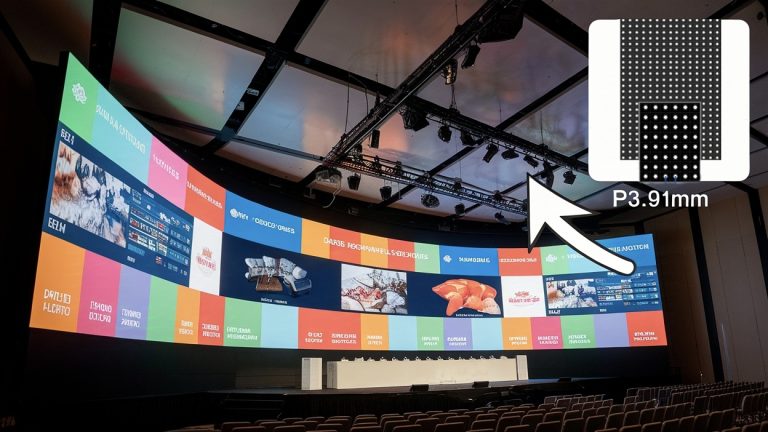
How to choose the appropriate pixel spacing for LED display screen in detail
Introduction
In the realm of LED displays, knowing the LED display pixel pitch is key for getting the best visual performance for different places you view them.
This article will explain pixel pitch and its importance for LED screens. It also offers guidance on selecting the best pixel pitch for various LED pixel display applications.
What is Pixel Pitch?

- Define Pixel pitch
Pixel pitch is the distance between pixels (LED wafers) on an LED display, also known as dot pitch.
Specifically, it describes the distance from the center of a given pixel to the center of an adjacent pixel, usually in pixel millimeters.
The size of the LED wall pixel pitch reflects the amount of space between two pixels, and it is related to the display resolution.
A smaller pixel pitch means less space between pixels. In other words, the higher the pixel density, the higher the screen resolution.
Therefore, a smaller pixel pitch provides a more detailed and clearer image display with higher pixel density.
For example, an LED display with a pixel pitch of 5mm, which means that the distance between the centers of two adjacent pixels is 5mm.
If the LED display pixel pitch is smaller, such as 2mm, then the pixel density of the display will be higher. The image details will be displayed more clearly.

Why Is LED Screen Pixel Pitch Important?
When you decide to invest in an LED video wall, the pixel pitch must be the first thing you need to consider. Because it directly affects your visual effect and budget.
This small measurement directly influences several key aspects of an LED display — including image clarity, viewing distance, screen size, and overall cost.
In short, the smaller the pixel pitch, the higher the image resolution, and the closer viewers can stand to the screen without seeing visible pixel gaps.
(1) Image Resolution and Clarity
A smaller pixel pitch means more pixels per square meter.
The higher pixel density produces sharper, more detailed visuals.
For instance, a P1.5 LED screen can deliver ultra-high definition suitable for 4K or 8K playback, while a P5 display shows visible pixel gaps at close range.
(2) Optimal Viewing Distance
Pixel pitch determines how far viewers should stand for the best visual experience.
Smaller pitches allow for closer viewing (ideal for indoor settings).
Larger pitches are suitable for long-distance viewing (like outdoor billboards).
- Common Pixel Pitches and Their Suitable Viewing Distances
| LED Screen Pixel Pitch (mm) | Visual Acuity Distance(~1 pixel invisible) | Comfortable Viewing Distance |
| P1.25 | ≈ 1.25 m / 4.1 ft | 1.5–2.0 m / 5–7 ft |
| P1.5 | ≈ 1.5 m / 4.9 ft | 2–2.5 m / 6.5–8 ft |
| P1.86 | ≈ 1.9 m / 6.2 ft | 2.5–3 m / 8–10 ft |
| P2 | ≈ 2.0 m / 6.6 ft | 3–4 m / 10–13 ft |
| P2.5 | ≈ 2.5 m / 8.2 ft | 4–5 m / 13–16 ft |
| P3 | ≈ 3.0 m / 9.8 ft | 5–6 m / 16–20 ft |
| P3.91 | ≈ 3.9 m / 12.8 ft | 6–8 m / 20–26 ft |
| P4 | ≈ 4.0 m / 13.1 ft | 7–9 m / 23–30 ft |
| P5 | ≈ 5.0 m / 16.4 ft | 8–10 m / 26–33 ft |
| P6 | ≈ 6.0 m / 19.7 ft | 10–12 m / 33–39 ft |
| P8 | ≈ 8.0 m / 26.2 ft | 13–16 m / 43–52 ft |
| P10 | ≈ 10.0 m / 32.8 ft | 15–20 m / 49–66 ft |
| P16 | ≈ 16.0 m / 52.5 ft | 25–30 m / 82–98 ft |
| P20 | ≈ 20.0 m / 65.6 ft | 30–40 m / 98–131 ft |
Reference Rule:
- Visual acuity distance ≈ pixel pitch (mm) × 1 meter.
- Comfortable viewing distance ≈ pixel pitch (mm) × 1.5–2 meters.
(3) Screen Size for a Given Resolution
To achieve a specific LED screen resolution (e.g., 1920×1080 or 3840×2160 for 4K LED display), the smaller the pitch, the smaller the physical size of the LED wall.
That’s why fine-pitch LED displays are ideal for spaces where high resolution is needed but space is limited.
(4) Brightness and Power Consumption
Larger pixel pitches typically offer higher brightness levels because of bigger LEDs and greater spacing.
Conversely, fine-pitch displays require more precise control circuits and may consume slightly more power per square meter to maintain consistent brightness.
(5) Screen Cost and Maintenance
Smaller pixel pitches require more LEDs and advanced manufacturing, which increases the cost of the LED video wall.
However, they also deliver superior quality and long-term investment value for high-end applications such as studios or conference rooms.
Advantages of High Pixel Density
High pixel density in LED screens enhances image clarity, improves detail, and gives viewers a more immersive viewing experience.
Higher pixel density ensures that content looks sharp and realistic, whether it’s used for advertising or entertainment.
This meets the expectations of today’s audiences who want high-quality visuals.
- Enhanced Image Clarity
Generally speaking, the higher the pixel density of the LED screen, the clearer the images and text presented. Thus, it improves the readability and visual effect of the content.
For example, high-density LED display pixel pitch in a shopping mall can display detailed product images and text, effectively attracting and informing customers.

- Improved Detail and Realism
With more pixels in a smaller space, LED screens can show intricate details and subtle colors more accurately.
This is beneficial for displaying high-resolution images and videos, providing a more immersive experience.
For example, in sports stadiums, high-density LED screens ensure that athletes’ movements are played back with clarity and detail. It will enhance audience engagement.
How to Calculate Pixel Density?
Pixel density is a key indicator of an LED display’s visual performance.
It refers to the number of pixels per square meter on the screen, which directly affects image sharpness and resolution.
The higher the pixel density, the more detailed and vivid the display will appear — especially when viewed up close.
(1) What Is Pixel Density?
Pixel density describes how tightly packed the LEDs are on the display surface. It’s usually expressed in pixels per square meter (pixels/m²).
Smaller pixel pitches mean the LEDs are closer together, which increases the total number of pixels within the same area and enhances the overall image quality.
(2) Formula for Pixel Density
- Pixels Per Square Meter
To calculate pixel density, you can use the following formula:
Number of pixels ÷ size of the image in square meters = pixels per square meter
- Pixels Per Square Inch (PPI)
PPI is a measure of pixel density, or resolution, on a computer screen, TV screen, or other display device.
The higher the PPI value, the higher the image quality.

(3) Pixel Density Example Calculations
Let’s calculate the pixel density for different LED pixel pitches:
| Pixel Pitch (mm) | Calculation | Pixel Density (pixels/m²) |
| P2.5 | (1000 ÷ 2.5)² = 400² | 160,000 |
| P2.0 | (1000 ÷ 2.0)² = 500² | 250,000 |
| P1.86 | (1000 ÷ 1.86)² ≈ 538² | 289,444 |
| P1.53 | (1000 ÷ 1.53)² ≈ 654² | 427,716 |
| P1.25 | (1000 ÷ 1.25)² = 800² | 640,000 |
From this table, you can see how rapidly pixel density increases as pixel pitch decreases.
For example, P1.25 has four times more pixels than P2.5, even though both displays might have the same physical dimensions.
(4) Choosing the Right Pixel Density
The ideal pixel density depends on your application and viewing environment:
- Indoor, close viewing: Choose P1.2–P1.8 (High density: over 300,000 pixels/m²).
- Mid-range or semi-outdoor: Choose P2–P3 (Moderate density: 100,000–250,000 pixels/m²).
- Outdoor, long-distance viewing: Choose P4–P10 (Low density: below 60,000 pixels/m²).
To calculate pixel density, use the simple formula:
Pixel Density = (1000 ÷ Pixel Pitch in mm)²
This metric helps determine how clear and detailed an LED screen can be. In general, smaller pixel pitch = higher pixel density = better visual performance, but also higher cost.
Understanding this relationship ensures you select the right LED display for your budget, viewing needs, and installation environment.
Applications for Different LED Screen Pixel Pitches
Different environments require different pixel pitches to achieve optimal visual performance and cost-effectiveness.
Below are general application categories for small, medium, and large pixel pitches.
(1) Small Pixel Pitch (P1.2–P2.5)
Applications:
- Control rooms & command center
- Conference and meeting rooms
- TV studios and broadcasting centers
- Indoor retail stores and luxury showrooms
These fine-pitch LED displays deliver crystal-clear, high-definition visuals suitable for close-up viewing.
For example, a P1.53 LED display can achieve 4K resolution within only 20㎡, providing cinematic quality even at short distances.

(2) Medium Pixel Pitch (P3–P4.8)
Applications:
- Shopping malls
- Airports and transportation hubs
- Indoor events or exhibition centers
- Stage backgrounds for performances
Medium-pitch LED displays balance cost, brightness, and resolution, making them a versatile choice for semi-indoor and rental applications.
They maintain visual clarity while covering larger viewing distances of 3–6 meters.

(3) Large Pixel Pitch (P5 and Above)
Applications:
- Outdoor advertising billboards
- Stadium scoreboards and perimeter screens
- Digital signage on building facades
- Outdoor public information displays
Large-pitch LED video walls offer exceptional brightness, wide visibility, and weather resistance.
Although they have lower pixel density, they are perfect for long-distance viewing (10 meters or more). The content remains clear and eye-catching even in bright daylight.
- Common Pixel Pitches for Different Types of LED Displays
| Display Type | Typical Pixel Pitches (mm) | Usage Scenarios |
| Indoor LED Display | P0.9, P1.25, P1.56, P1.86, P2, P2.5 | Meeting rooms, studios, control centers, retail displays |
| Outdoor LED Display | P4, P5, P6, P6.67, P8, P10 | Billboards, stadiums, building facades, transportation hubs |
| Rental LED Display | P2.6, P2.9, P3.91, P4.81 | Stage events, exhibitions, concerts, and temporary installations |
| Transparent LED Display | P3.91×7.81P7.81×7.81
P10.42×10.42 |
Glass walls, shopping malls, showrooms, brand windows |
| Poster LED Display | P1.86, P2, P2.5, P3 | Indoor advertising, store entrances, exhibitions |
In summary, LED display pixel pitch is more than just a technical number. It defines the performance, application, and cost of an LED video display.
- Smaller pitch = higher definition, closer viewing, higher cost
- Larger pitch = lower resolution, longer viewing distance, lower cost
Understanding how pixel pitch impacts image quality, you can achieve the perfect balance between visual performance, budget, and display environment.
How to Calculate the Best LED Display Pixel Pitch I Need
Calculating the pixel pitch for an LED screen involves determining the distance between adjacent pixels.
This directly affects the resolution and viewing experience of the display.
Here’s how you can calculate the LED pixel pitch:
(1) Determine Viewing Distance and Resolution Requirements
- Viewing Distance
Determine how far the viewer looks at the LED screen. This can range from close-up (e.g.indoor LED displays) to far away (e.g., large outdoor billboards).
- Resolution Requirements
Determine the desired resolution of the screen. This is usually defined in pixels (width x height). For example, the Full HD resolution is 1920 x 1080 pixels.
(2) Calculate LED Screen Pixel Pitch
Use the viewing distance and resolution requirements to calculate the optimal LED display pixel pitch.
A commonly used guideline is that the pixel pitch in mm should be approximately equal to the viewing distance in meters for standard viewing angles.
Formula: Pixel Pitch (mm)=Viewing Distance (m)/Resolution Width (pixels)
Example Calculation: If there is an outdoor LED screen, the viewer is about 10 meters away from it, in the case of full HD resolution (1920 pixels wide), Pixel Pitch= 10 m/1920 pixels =0.0052 m=5.2 mm.

Pixel pitch calculator
Therefore, for a Full HD LED screen viewed from 10 meters away, a pixel pitch of around 5.2 mm would be suitable.
How to Choose the Best LED Display Pixel Pitch?
Choosing the optimal pixel pitch involves considering several key factors, which ensure the LED pixel display meets your specific requirements and provides the desired visual impact.
(1) Screen Size
When determining the size of your LED panel, you can calculate the optimal pixel pitch backward.
For a rectangular board where the height is less than the width, a common method to achieve a standard resolution of 1920 x 1080 is to divide the horizontal dimension (in feet) by 6.3 to find the pixel pitch (in mm).
For instance, if your board measures 25.2 x 14.2 feet, a 4mm pixel pitch is recommended, as 25.2 divided by 6.3 equals 4.
(2) LED Screen Optimal Viewing Distance (OVD)
If you want to determine the ideal viewing distance of your LED pixel wall—such as for a billboard visible from a highway—simply divide the desired viewing distance by 8 to get the optimal pixel pitch (in mm).
For example, if the viewing distance is 32 feet, a 4mm pixel pitch would be suitable.
(3) LED Screen Resolution
The resolution of the LED screen also plays a significant role.
As mentioned earlier, higher resolution screens require smaller pixel pitches to ensure sharpness and detail in the displayed content.
For applications demanding high-definition visuals, such as broadcast studios or control rooms, a finer pixel pitch is essential to deliver clear images and content.

(4) Indoor or Outdoor
- Outdoor LED Display
For outdoor LED screens, which need to cope with bright sunlight and various weather conditions, a larger pixel pitch is usually better.
Screens with a pitch of P10, P12, or P16 are suitable for distances of 10 to 20 meters. For longer distances (30 meters or more), P20 or larger is preferred.
In addition, outdoor screens also need to have high brightness and be weatherproof.
- Indoor LED Screen
Indoor LED screens, on the other hand, have a shorter viewing distance, so a smaller pixel pitch is needed for clearer images.
For viewing distances of 3 to 6 meters, screens with P2.5, P3, or P4 are appropriate.
For even closer distances (1.5 to 3 meters), P1.5 or P2 works best.

(5) Money, Money, Money
Choose the most appropriate pixel pitch within your calculation range to achieve a balance between LED screen cost and benefit.
If your viewer is far away from the display screen, it is OK to choose a screen with a slightly larger dot pitch.
Development Trend of LED Display Pixel
In recent years, the LED display pixel pitch has been steadily shrinking.
Traditional pixel pitches like P3 and P4 are being replaced by P2, P1.5, and even P1.2 now. This trend allows screens to maintain high resolution and clarity even at greater distances.
So, how to realize it under the current technology?
(1) Wide Viewing Angles
LED panels with wide viewing angles, such as IPS (In-Plane Switching) panels, can ensure consistent image quality from different angles.
This is the technology most directly related to pixel spacing. It can improve the display effect when viewed from various distances.
(2) Curved or Bendable Screens
In some application scenarios, using curved or bendable LED screens can improve the effect of long-distance viewing.
It allows the audience to get a consistent visual experience from different angles.

(3) Modular Design
Modular design allows for flexible adjustments to the LED screen’s display area and resolution, accommodating different viewing distances and application needs.
FAQs About LED Pixel Pitch
(1) What is pixel pitch in an LED display?
Pixel pitch refers to the distance between the centers of two adjacent pixels (LED clusters), measured in millimeters.
It determines how tightly the LEDs are arranged and directly affects image resolution and viewing distance.
(2) How to calculate LED pixel pitch?
Pixel pitch is a physical specification provided by the manufacturer, not something you calculate manually.
However, you can use it to estimate screen size or pixel density.
(3) What is the rule of thumb for LED pixel pitch?
A simple rule:
Optimal viewing distance (meters) ≈ Pixel pitch (mm) × 1–2
For example, a P2 LED screen appears best from a distance of about 2–4 meters.
(4) What is the best pixel for an LED screen?
It depends on the application and viewing distance:
- Indoor close-up viewing → P1.25–P2
- Medium viewing distance → P2.5–P4
- Outdoor long-distance viewing → P5–P10
There’s no single “best” pixel — it’s about finding the right balance between clarity, size, and cost.
(5) Is a lower pixel pitch better?
Yes, a lower pixel pitch means smaller gaps between LEDs, resulting in higher resolution and sharper images.
However, it also increases cost and power consumption.
(6) Does a higher pixel count mean better quality?
A higher number of pixels (or higher pixel density) generally means better image quality, especially for close-up viewing.
But the improvement depends on content resolution and viewing distance.
(7) What is pixel density in an LED screen?
Pixel density refers to the number of pixels per square meter of the LED display.
Higher pixel density = higher resolution and smoother visuals.
(8) How does pixel pitch affect the cost of an LED screen?
Generally, screens with smaller pixel pitches are more expensive because of the need for higher resolution and more advanced technology.
Larger pixel pitches tend to be more cost-effective but offer lower resolution.
(9) Can pixel pitch be adjusted on an LED screen?
The pixel pitch is fixed according to the design of the screen and cannot be adjusted after production.
For different scenarios, you need to choose a screen with the appropriate pixel pitch.
Summary
Whether you are setting up a large outdoor billboard, an indoor retail display, or an LED pixel wall in a command center, as long as you carefully evaluate the above factors and their interactions, you will be able to select the optimal pixel pitch for your LED screen.