How to Size an LED Screen Wall for Your Event
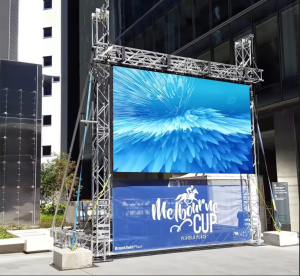
“Six by four meters” means nothing until it is standing in your venue. Sizing an LED wall is part geometry, part content format, part budget — and getting it right at the planning stage is the difference between a screen that carries the event and one that fights it. This guide uses the ARC3.91 outdoor rental LED display — a 500×1000mm rental cabinet — to make the arithmetic concrete.
Step 1: Start With Your Farthest Viewer
Legibility, not wall size, is the first constraint. For video content, viewers should sit no farther than about 8–10× the screen height; for readable text, roughly 4–6× the character height.
A 3-meter-tall wall serves video comfortably to about 25–30 meters. If your last row is 40 meters back, either grow the wall or keep on-screen text very large.
Step 2: Count Cabinets, Then Round
The ARC3.91 comes in 500×1000mm cabinets, so any wall is a whole number of units:
| Wall design | Cabinets | Best for |
|---|---|---|
| 3×2 m (3×2) | 6 | Conference backdrop, DJ booth |
| 4×3 m (4×3) | 12 | Weddings, ballrooms |
| 6×3.5 m (6×3.5→7) | 21 | Corporate keynote stage |
| 10×5 m (10×5) | 50 | Festival side stage |
| 12×6 m (12×6) | 72 | Mainstage, fan zones |
Each 500×1000 cabinet carries 32,768 pixels at 3.91mm pitch, so a 4×3m wall renders 12 cabinets × 32,768 = about 393,000 pixels — comfortably above 1080p-class density at typical viewing distances.
Step 3: Match Your Content Format
- 16:9 video → build to classic ratios: 6×3.5m is near 16:9; 4×3m is 4:3-ish for legacy content
- Split content (speaker + slides + lower thirds) → wider walls work better; add width before height
- Scenic/abstract backdrops → any proportion works; designers often prefer extra width for light shows
Step 4: Sanity-Check the Venue
Three physical constraints decide whether your dream size survives contact with the room:
- Ceiling height minus rigging hardware minus safe clearance = maximum screen height
- Floor loading — a 4×3m ARC3.91 wall is 12 × 15kg = 180kg of cabinets plus structure; most venues accept this easily
- Truck access — 65mm-thin cabinets pack efficiently, but confirm the load-in path fits your case count
Step 5: Budget by Utilization, Not by Square Meter
Renting prices by size and duration; owning prices by utilization. If you run events weekly, owning a 12-cabinet wall pays back quickly — and the full pricing for that calculation is on the ARC3.91 product page.
The One-Line Answer
Size the wall to your farthest viewer and your content format, round to whole 500×1000 cabinets, then check ceiling, floor and trucks. Do those four checks and the screen will disappear into the event — which is exactly what a great screen should do.