Building, Touring and Maintaining a Rental LED Wall
Event crews are judged on load-in and load-out. The screen that assembles fast, travels well and fixes from behind is the screen rental companies rebook. This guide covers the working practices for building, touring and maintaining the ARC3.91 outdoor rental LED display.
Planning the Wall in Cabinet Counts
A 500×1000mm cabinet means every wall dimension is simple arithmetic:
| Wall size | Cabinets | Build note |
|---|---|---|
| 4×3 m | 8×3 = 24 | Two-person ballroom build |
| 6×4 m | 12×4 = 48 | Standard corporate stage |
| 10×6 m | 20×6 = 120 | Festival mainstage |
| Floor-supported totem 2×4 m | 4×4 = 16 | Stackable base required |
Because one 500×1000 cabinet replaces two 500×500 units, seams and inter-cabinet cable runs are cut in half — fewer failure points and faster assembly.
Rigging: Three Standard Methods
- Truss hanging — top-hung on box truss with standard hanging bars; 15kg per cabinet keeps point loads low
- Ground support — tower system with base plates for sites without overhead structure
- Stack / totem — floor-stacked columns with safety ties for lobbies and exhibitions
The 65mm cabinet depth keeps the screen face close to the truss line — a cleaner look and less ballast than deep fixed-install cabinets pressed into rental duty.
Power and Signal Discipline

- Power: 200–240VAC into Muen supplies; plan one 16A circuit per 8–10 cabinets on a typical show wall
- Data: Novastar receiving cards loop per column; one Cat6 per column back to the sending box
- Label everything once: pre-labeled looms cut a 120-cabinet build by an hour and eliminate the classic “dead column” fault
The Camera-Ready Configuration
Before doors open, set the wall up for capture:
- Lock brightness at show level and enable Novastar auto-dim for late-night scenes
- Verify 7680Hz output on the actual broadcast camera — not just a phone
- Color-calibrate the wall as one canvas, not per cabinet
This 20-minute routine is what separates footage that looks hired-professional from footage that looks like a screen was in the way.
Maintenance in the Rental Cycle
| When | Task |
|---|---|
| After every strike | Visual module check; log any dead pixels per cabinet |
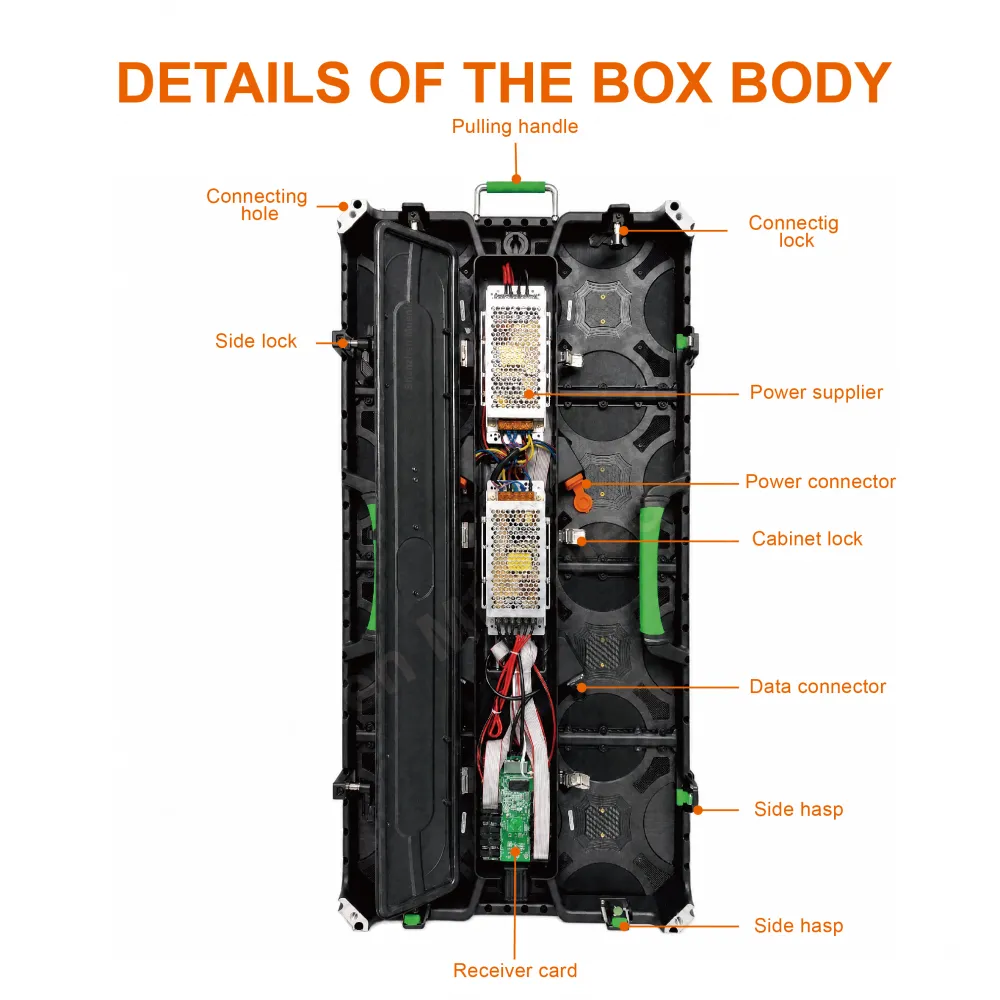
| Monthly | Rear inspection: connectors, latches, power supplies |
| Per season | Full calibration; firmware alignment across the fleet |
| Annually | Cabinet gasket and IP65 seal inspection; latch torque check |
Rear service is the workload multiplier: a module swap on a built wall takes minutes from behind, without touching the face or rigging. Gasket integrity is what keeps the IP65 promise — check it annually and after any cabinet drop.
Touring and Storage
Standard flight cases sized for 500×1000 cabinets protect the face and latch hardware in transit. Store cabinets face-to-face with foam, keep them dry, and cycle the stock: the cabinets that travel most should be the ones maintained most. Accessories, case dimensions and spare-module options are listed on the ARC3.91 product page.